Purpose-built for lawn and garden businesses

The operating system for lawn care businesses.

Built for a one-person business first.
Crew tools stay optional until you need them.

Work out how long each job takes and what it must be priced at, standing on the customer's verge with your phone.
Then manage clients, scheduling, spray records, invoicing and profitability in the same app.
Start on your own for free, and the same app is still there when you take on your first hire.

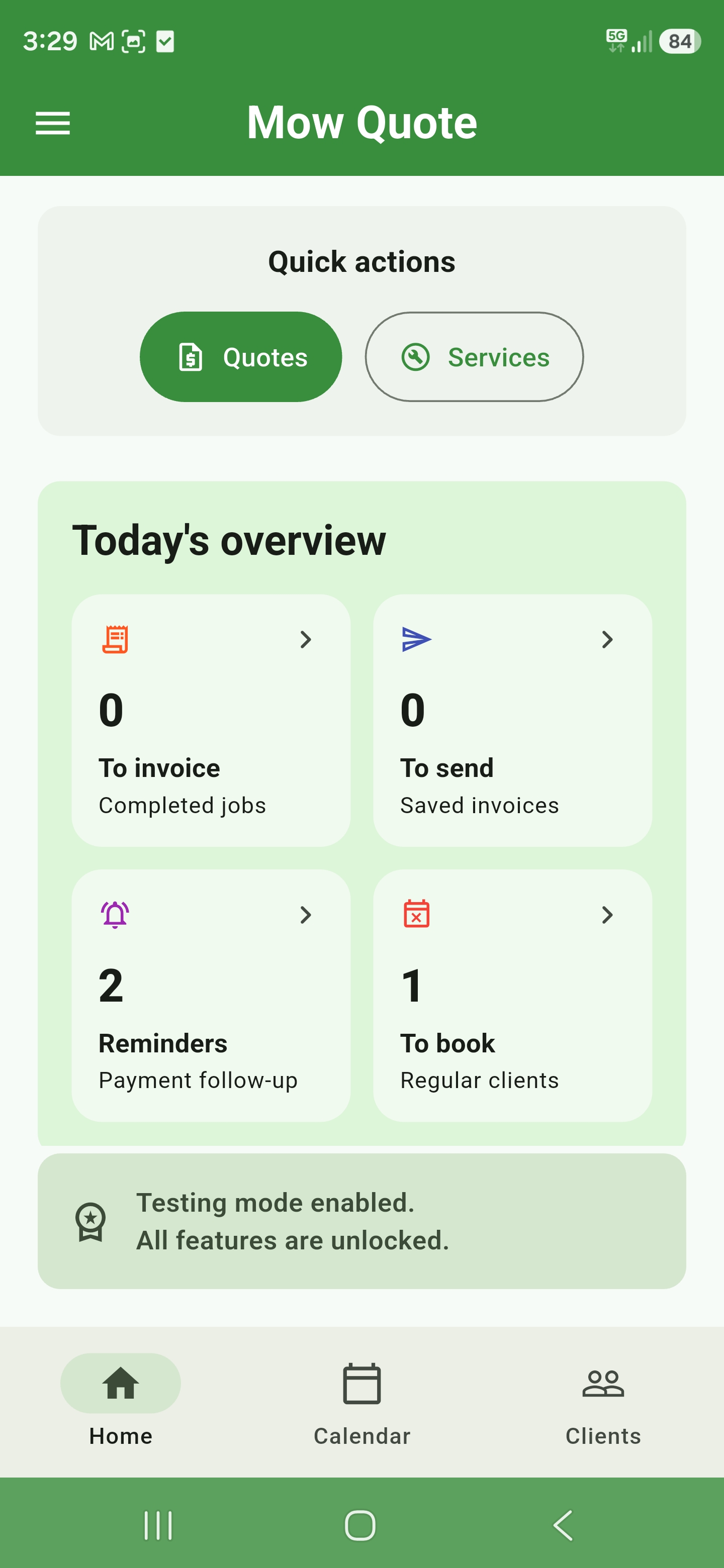
Mow Quote home dashboard showing today's overview and quick actions

Generic CRMs organise the work. Mow Quote understands it.

Built for the work you actually do

Built for mowing, gardening, spraying, turf, renovations and landscaping.
Mow Quote forecasts how long each job should take from your calibrated mower and task rates, and prices it from what your labour and equipment actually cost.
The accepted work then carries through customer approval, scheduling, job tracking, reporting and accounting.
One person or a crew - it is the same app either way.

Specialist estimating Quote Health CRM Schedule Teams Spray records Insights & profitability Accounting integrations

Other apps

How Mow Quote differs from other apps

Some apps help price the job.
Others help run it.
Mow Quote does both.
From the first estimate through scheduling, invoicing and profitability.

Estimating built on a library of timed jobs prices at the pace that produced the library.
In a first season you are slower than that, so the quote falls short of the time the work takes.
Once you are quick, the same average hands back the margin your speed earned.
Mow Quote calibrates to the person doing the work, and the rates stay yours to tighten as you get faster.

Prices, plans and feature inclusions vary by app and may change.
Capability Mow Quote Quote Specialist Round Specialist Operations Platform
Business fit
Works for one person without crew setup Included Included Included Included
Multi-user crew workspaces and permissions Included Not included Included Included
US settings and imperial units Included Not included Not included Included
Quoting and estimating
Predict mowing duration before the quote Included Included Not included Not included
Price guidance tied to hourly profitability Included Included Included Not included
Real labour, equipment, overhead and minimum-charge costing Included Included Not included Included
Per-service health grade against your target rate Included Not included Not included Not included
Satellite lawn area measurement Included Included Included Not included
Mowing quote engine Included Included Included Not included
Gardening quote engine Included Not included Not included Not included
Turf, renovation, spraying and cleanup quote builders Included Not included Not included Not included
Chemicals and compliance
Product quantities and PPE guidance Included Included Not included Not included
Compliance spray logs with weather and GPS Included Not included Not included Not included
Running the work
Secure quote link and customer response Included Not included Included Included
Accepted quote booked as the same job Included Not included Included Included
Recurring schedules and route optimisation Included Not included Included Included
Complete, invoice and track payment Included Not included Included Included
Multiple accounting integrations Included Not included Not included Included
Profitability view for completed jobs or existing clients Included Not included Included Included

Features

More than a generic service CRM.
Everything from lawn-specific estimating, real crew costs, minimum-charge guidance and Quote Health to secure quote approval, scheduling, team permissions, chemical records and performance insights.
See the full feature list

Lawn quoting

Basic or Advanced when you need it

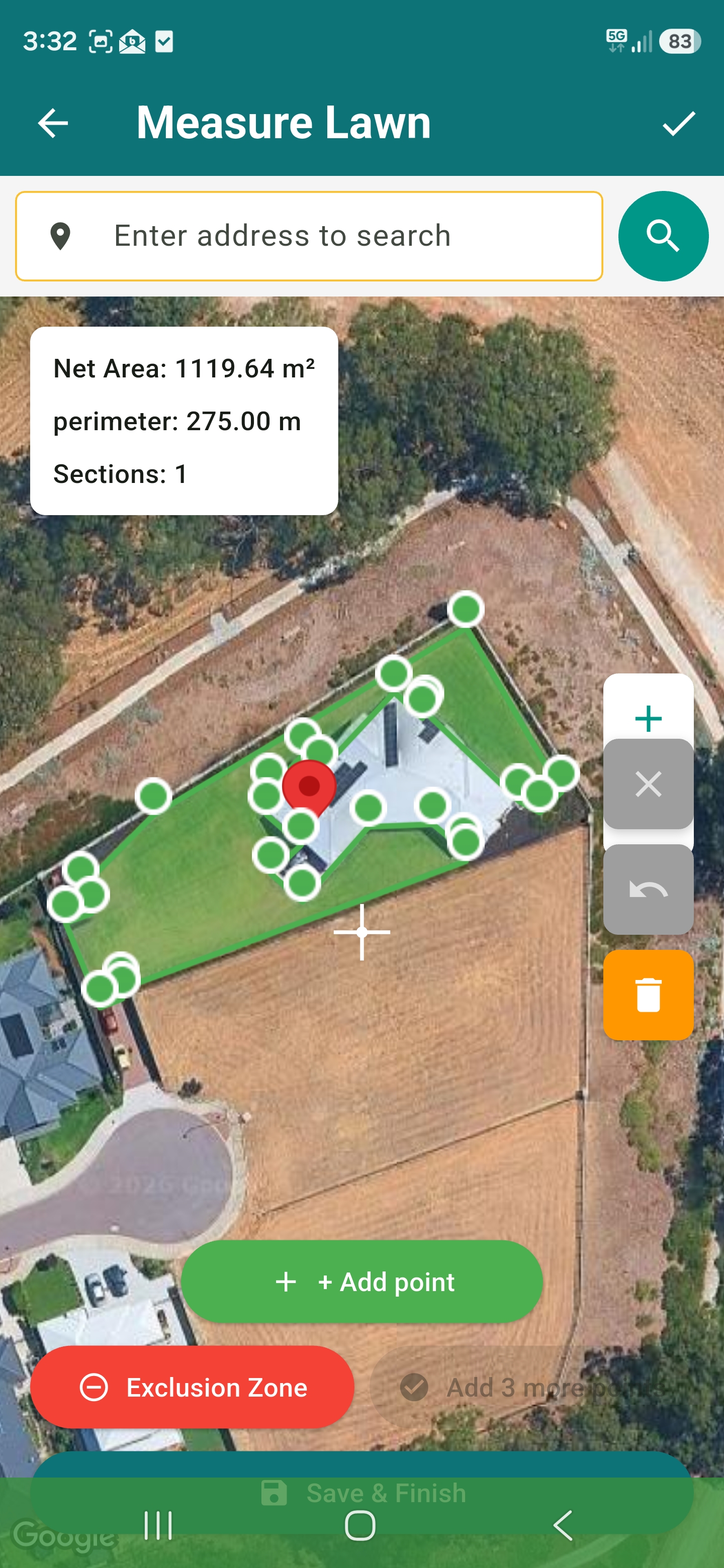
Start with a cleaner Basic quote screen, switch to Advanced for detailed pricing, then measure lawn area from satellite and pull m² straight into the quote.

  • Basic and Advanced form modes with configurable sections
  • Mower-specific rates, minimums, cut width, speed, and bagging
  • Area-based lawn quotes with per-acre pricing options
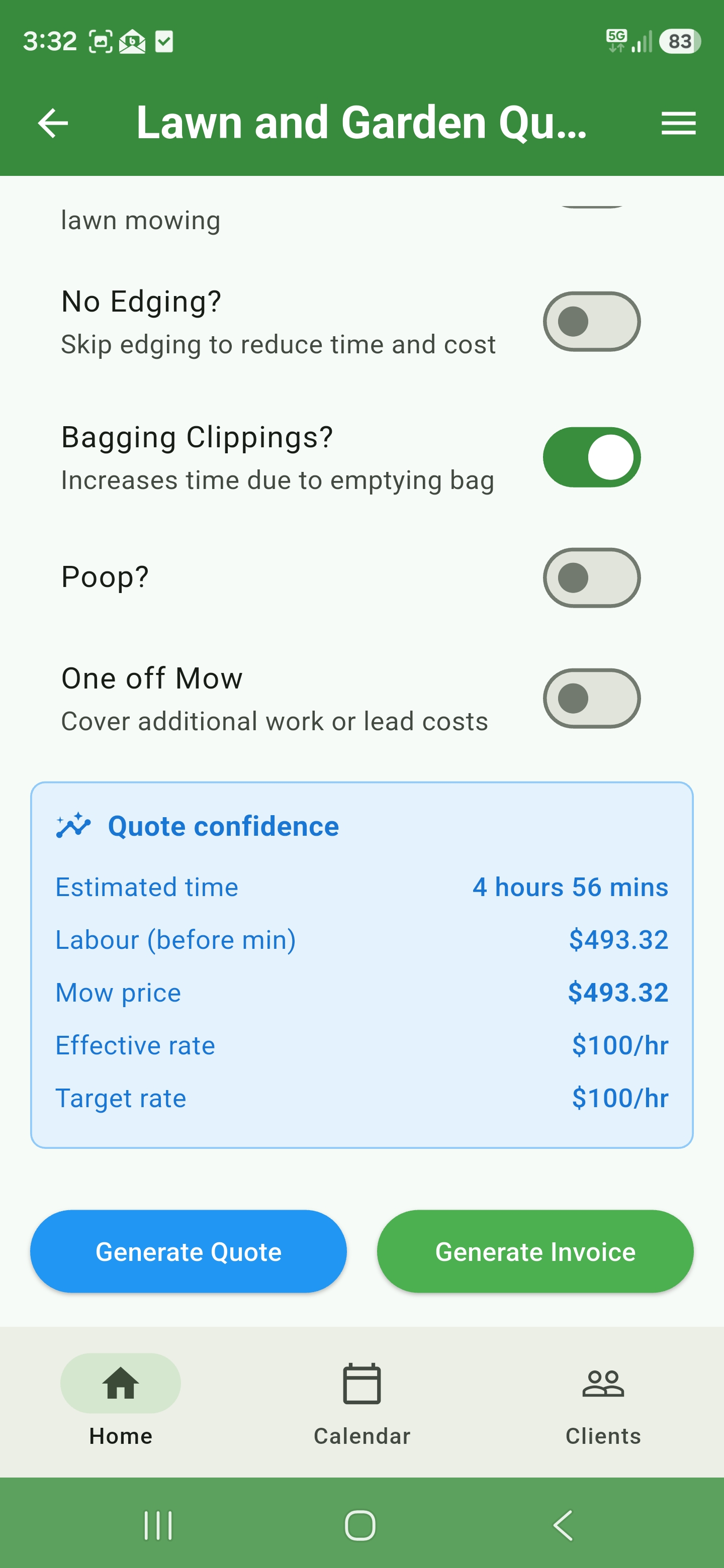
Lawn and garden quote with quote confidence panel
Completed satellite lawn measurement
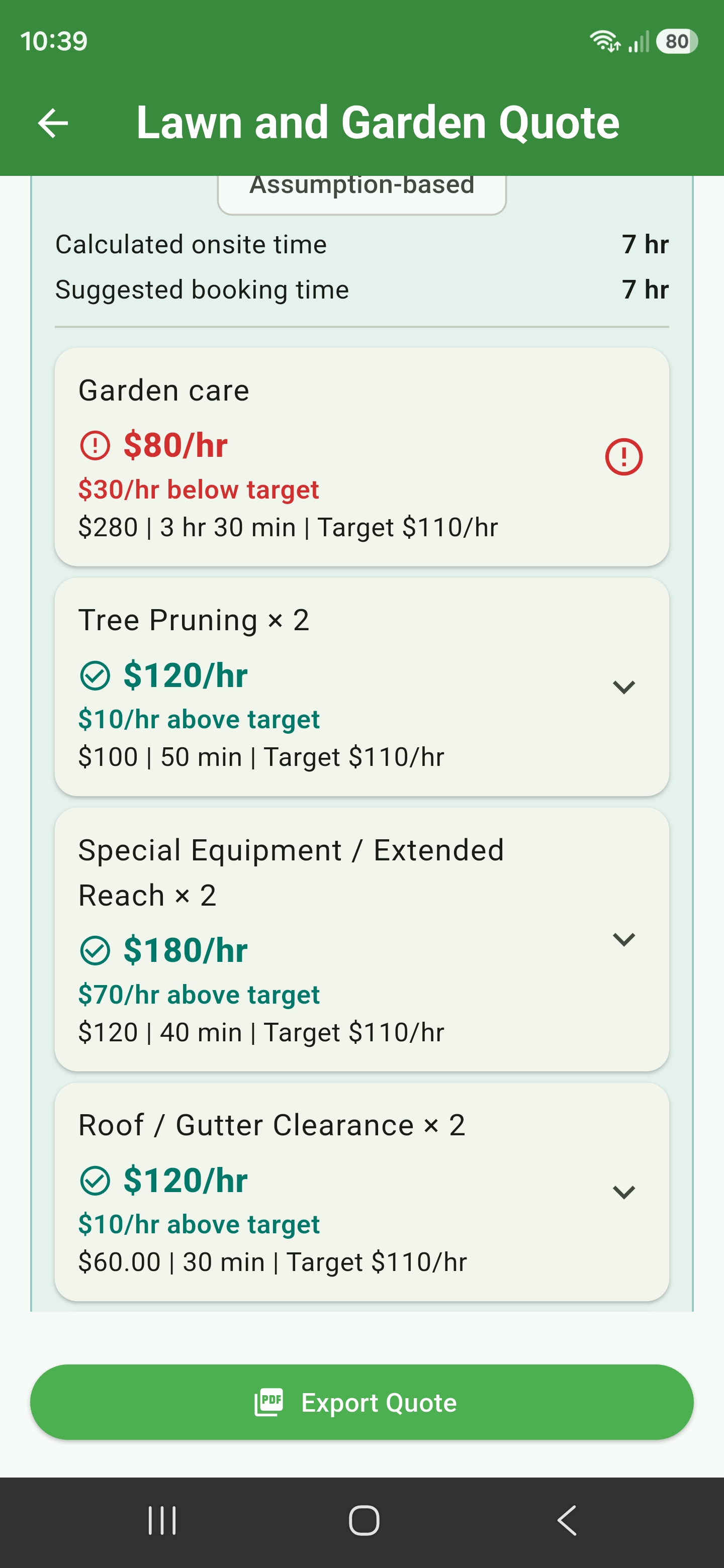
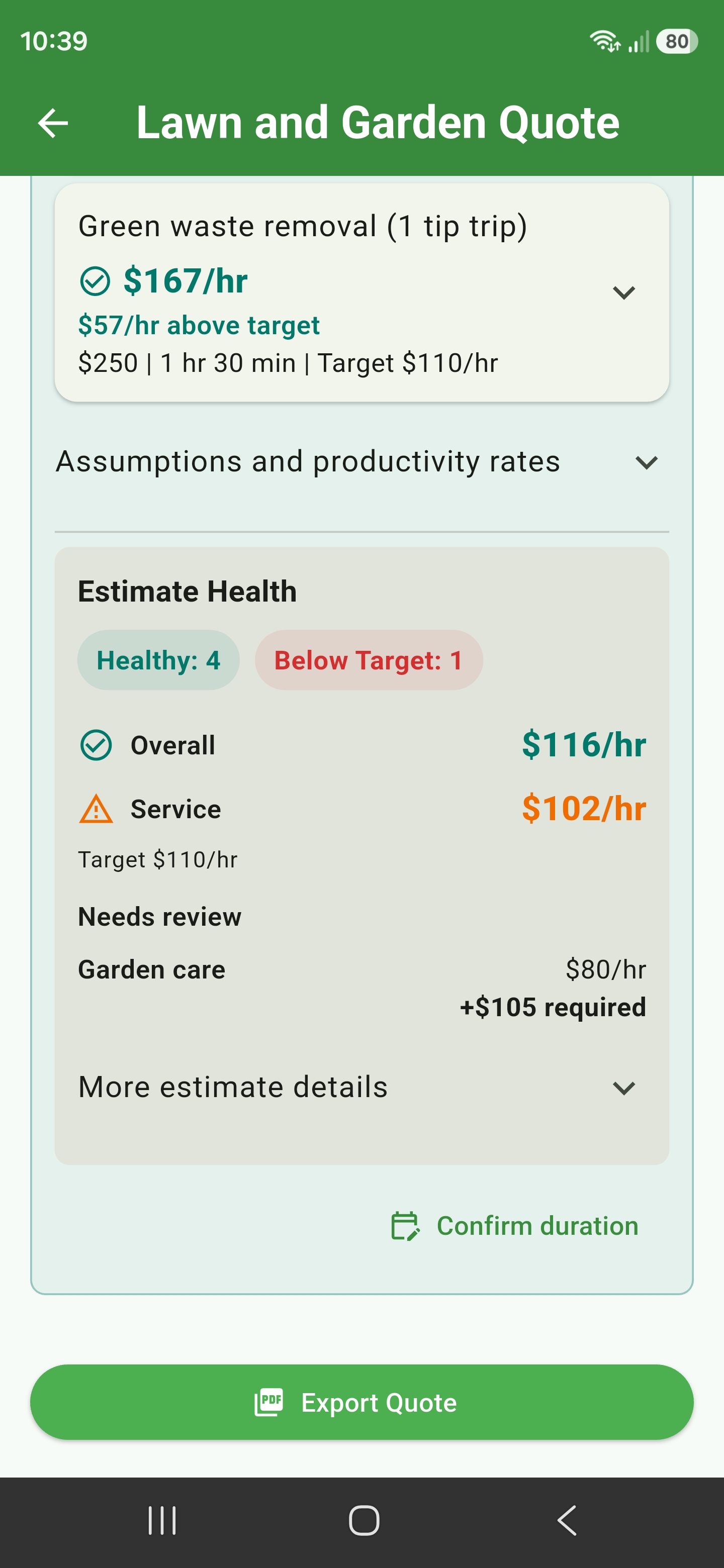
Quote Health service cards comparing Garden Care, Tree Pruning, equipment and roof clearance productivity against a target hourly rate

Quote Health

Every service graded before you send it

Mow Quote scores each service on the quote against your target hourly rate and gives it a grade: healthy, needs review, or below target.
You see the grade while you are still building the quote, not after you have done the work.

  • A health grade on every service - healthy, needs review, or below target
  • Identify whether price, estimated time, or job logistics create the gap
  • Compare the required price with the time supported by the current price
  • Review the source settings without automatically changing the quote
Quote Health summary showing overall and service productivity, the target hourly rate and additional revenue required for Garden Care
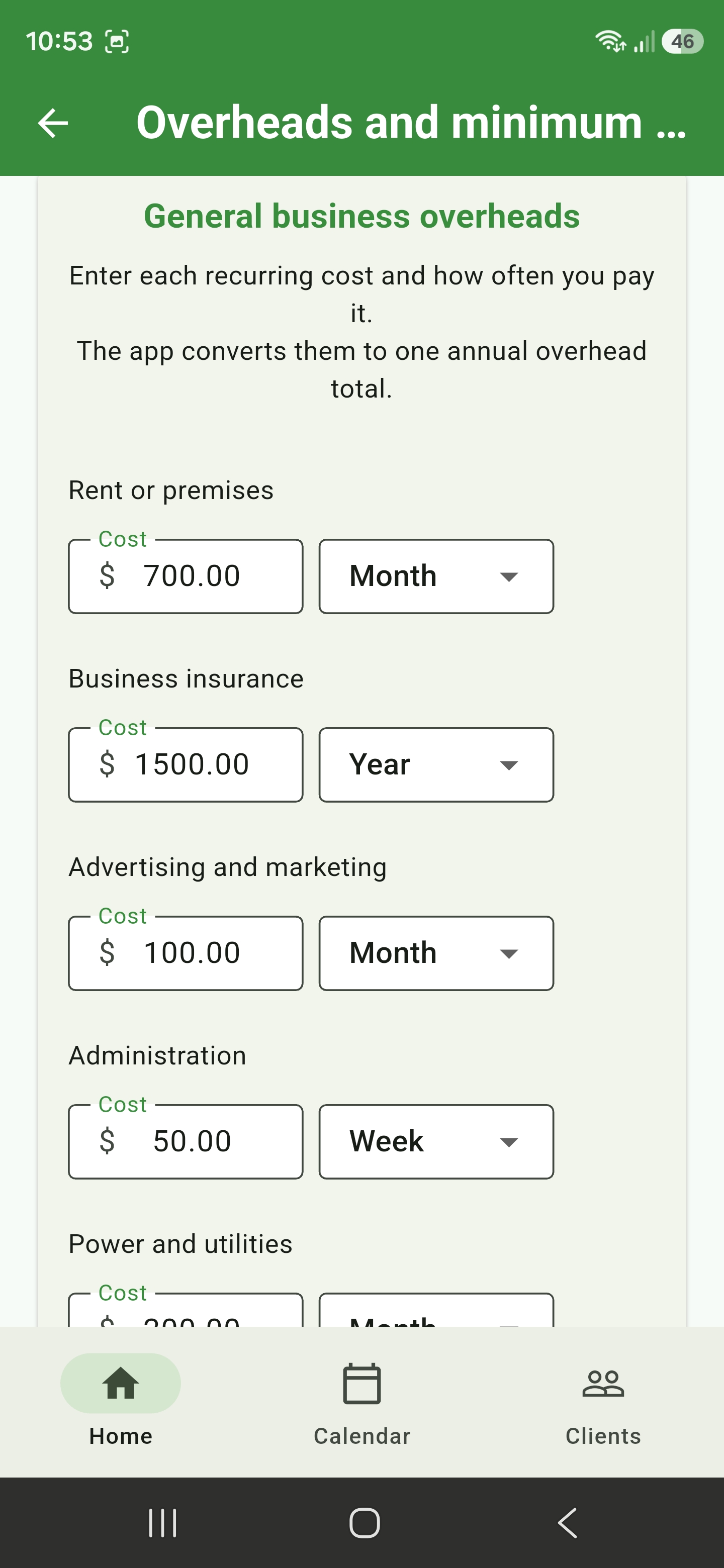
General business overhead settings for rent, insurance, advertising, administration, and utilities

Business costs & assets

Turn recurring expenses and equipment ownership into practical hourly costs

Record the costs that keep the business running, then let Mow Quote convert them into annual overhead recovery and asset running rates.

  • Enter rent, insurance, advertising, administration, utilities, and your own custom recurring costs
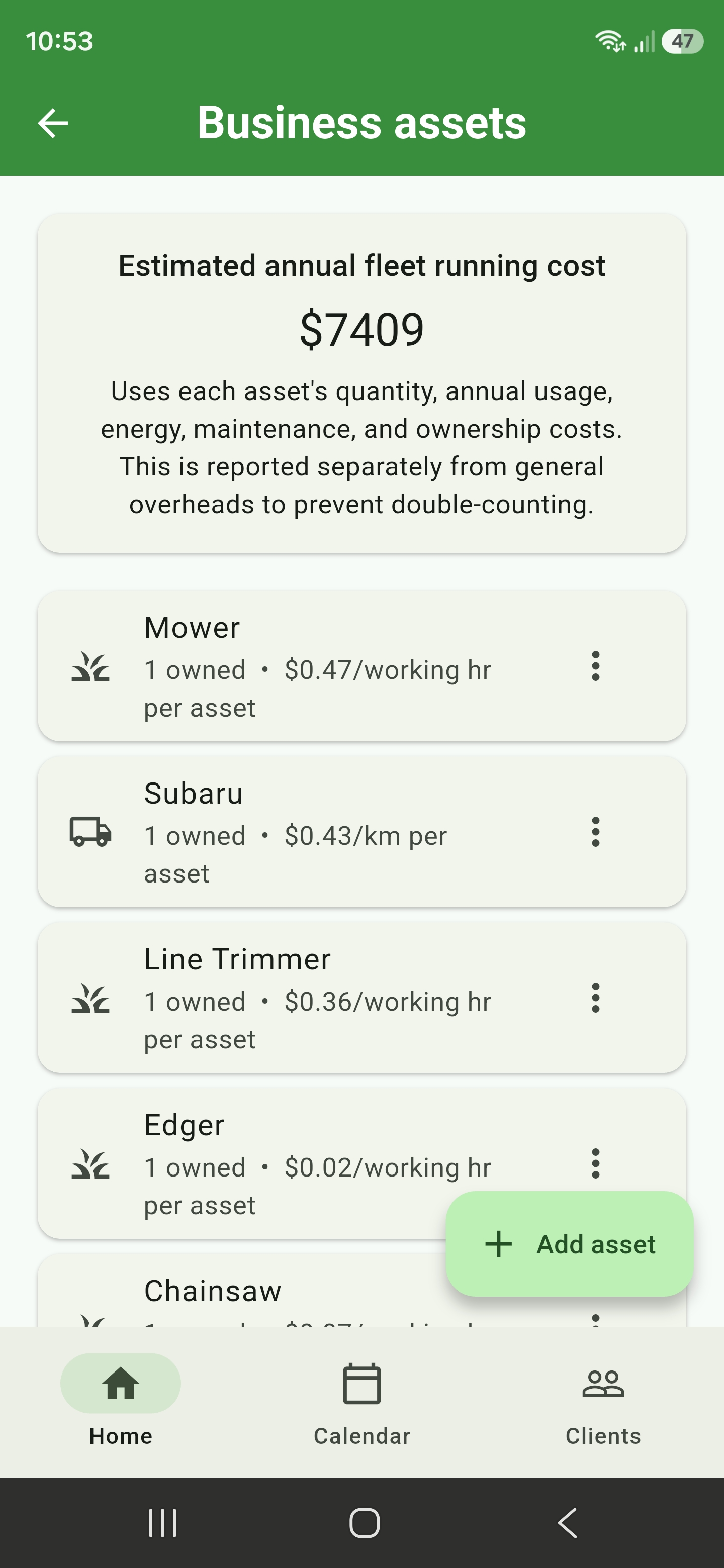
  • Record vehicle and equipment ownership, maintenance, fuel, electricity, and running costs
  • Keep asset servicing separate from general overheads to avoid double-counting
  • See annual fleet cost and the overhead amount to recover through billable work
  • Free accounts keep business-cost records on this device; eligible paid accounts can sync them between devices
Business asset register showing annual fleet cost and per-working-hour or per-kilometre asset rates

What your setup costs to run

Price the labour and equipment that actually does the job, even when that is just you

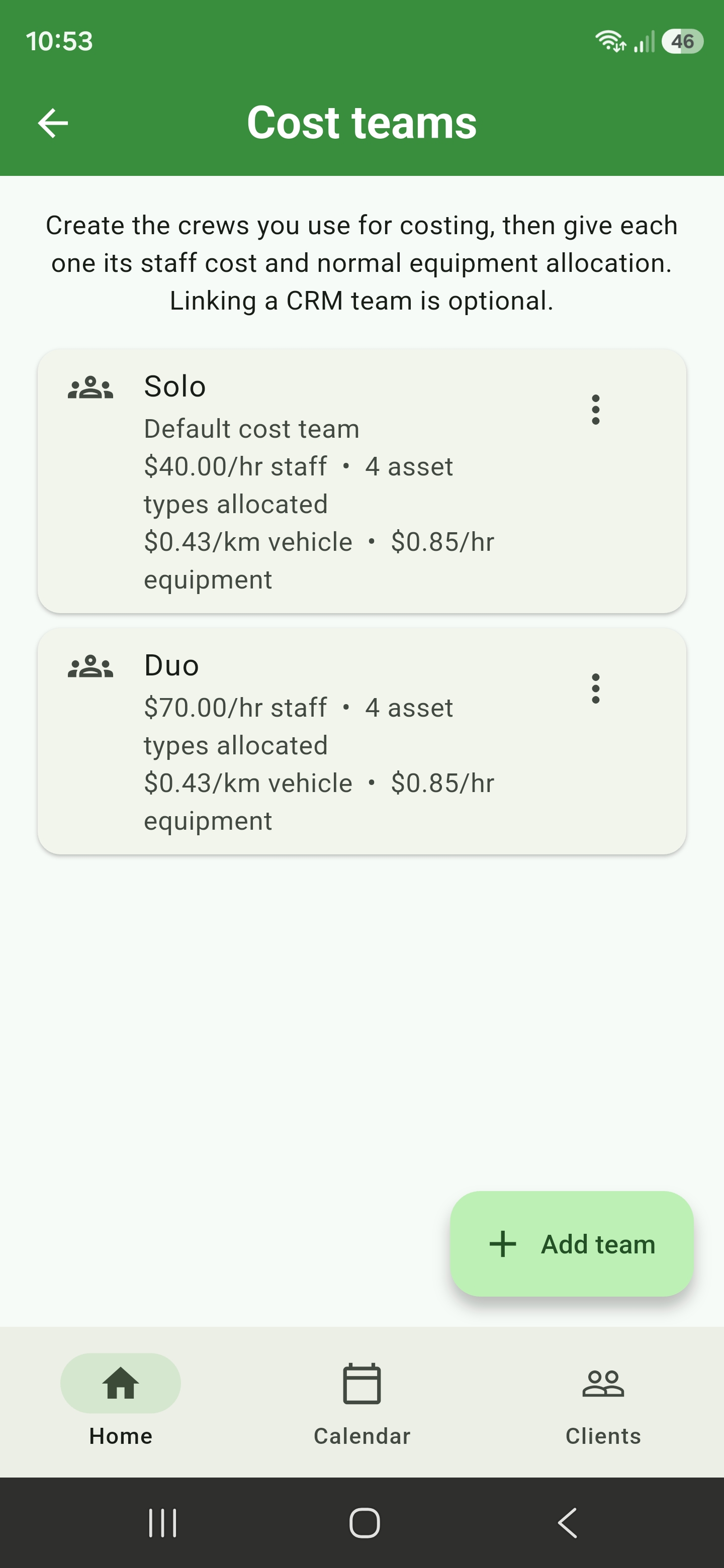
Set up how you work and allocate the vehicles and equipment you use.
The app calls these cost teams, and a solo round is simply a team of one - most people only ever set up Solo.

  • Start with just yourself and one hourly cost, or add named staff later
  • Register differently priced vehicles, mowers, battery tools, and other equipment as separate assets
  • Assign the quantity of each asset you take to a job
  • See the combined labour, vehicle, and equipment cost per hour
Solo and Duo cost teams showing staff cost and allocated vehicle and equipment rates
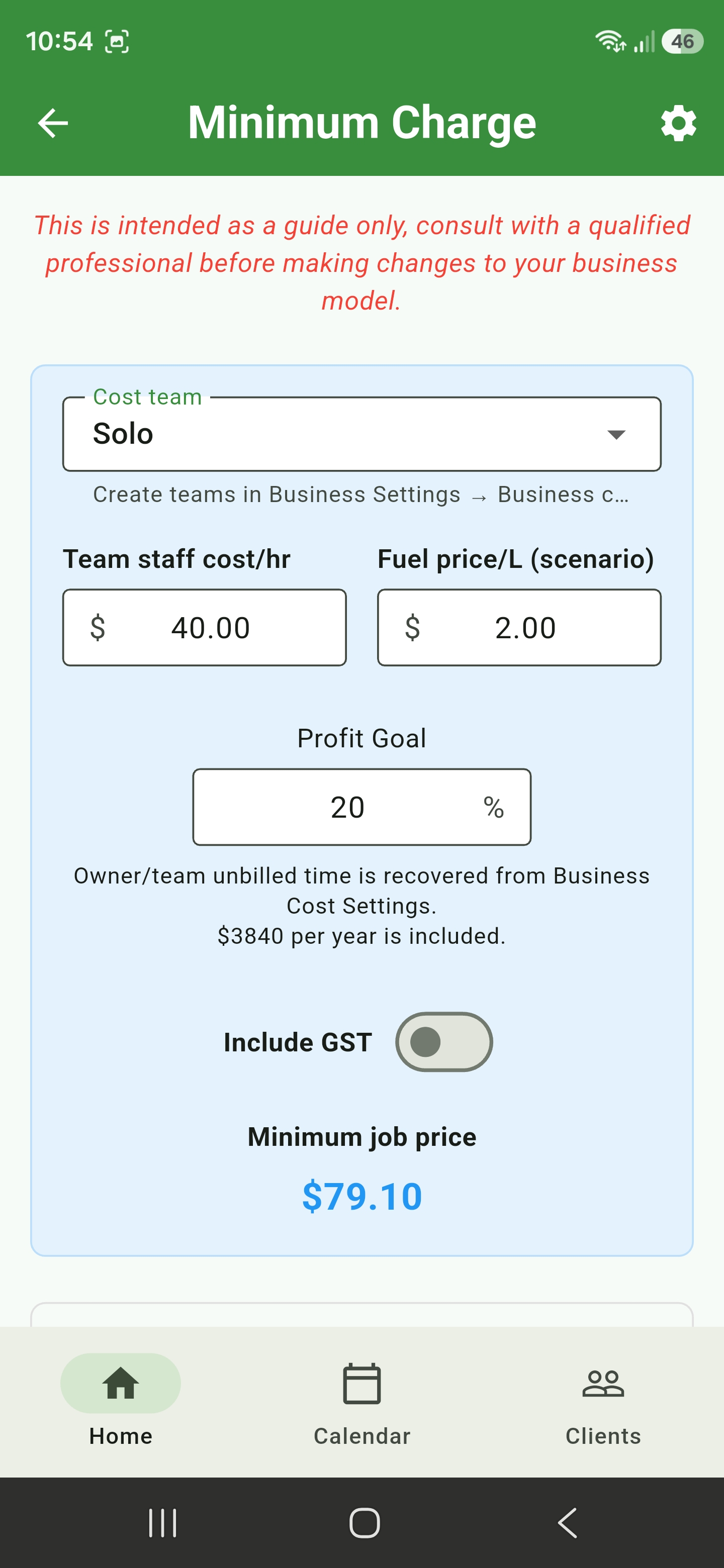
Minimum Charge calculator using the selected Solo cost team, staff cost, fuel scenario, unbilled time recovery, and profit goal

Your real minimum charge

Set a practical floor from what the job actually costs you, even if that is you and a ute

Mow Quote combines your labour, vehicle, and equipment costs with unbilled time, overhead recovery, and your profit goal, and tells you the least the job can be worth doing for.
  • Works from a solo setup, and compares a second person later without rebuilding it
  • Uses the specific vehicles and equipment you actually take
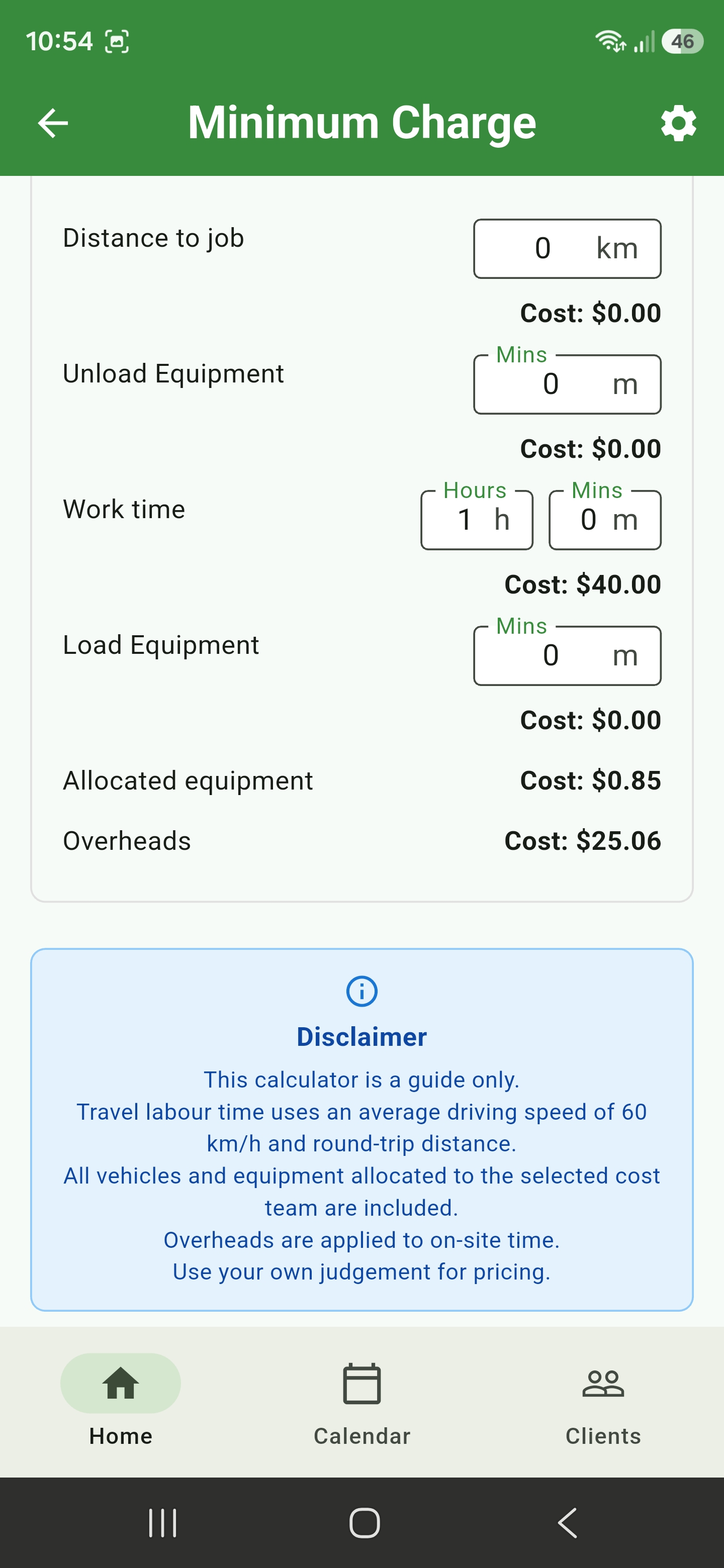
  • Review travel, loading, work time, allocated equipment, and overhead costs
  • Include return travel, unbilled labour recovery, profit, and GST settings
  • Carry the same cost basis into travel guidance and the quote-summary minimum-charge check
Minimum Charge cost breakdown for distance, loading, work time, allocated equipment, and overheads

Customer quote sharing

Let customers review and respond online

Create a secure public quote link from a saved customer quote, copy it, and send it by SMS or email. Customers can review the quote online and accept or reject with an optional note.

  • Secure quote links with optional access codes
  • Customer-facing quote viewer with business details and totals
  • Accept or reject actions without exposing internal quote data

* Only available on the Basic or Professional tier plans.

Where to find it

Saved quote files

Open a client, choose the link icon on a saved quote, then send the copied quote link to the customer.

View demo quote

Book the job from the quote

Carry the agreed work into the calendar

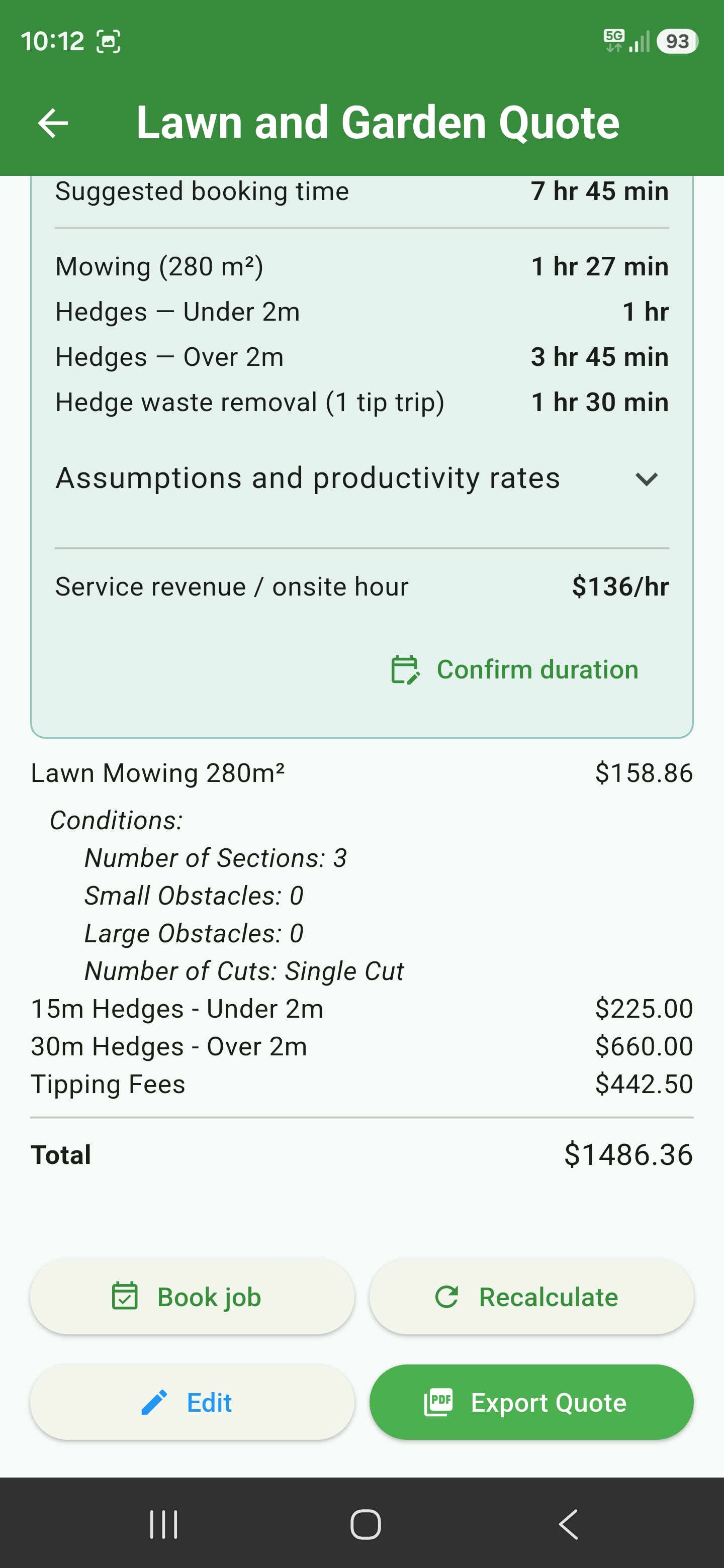
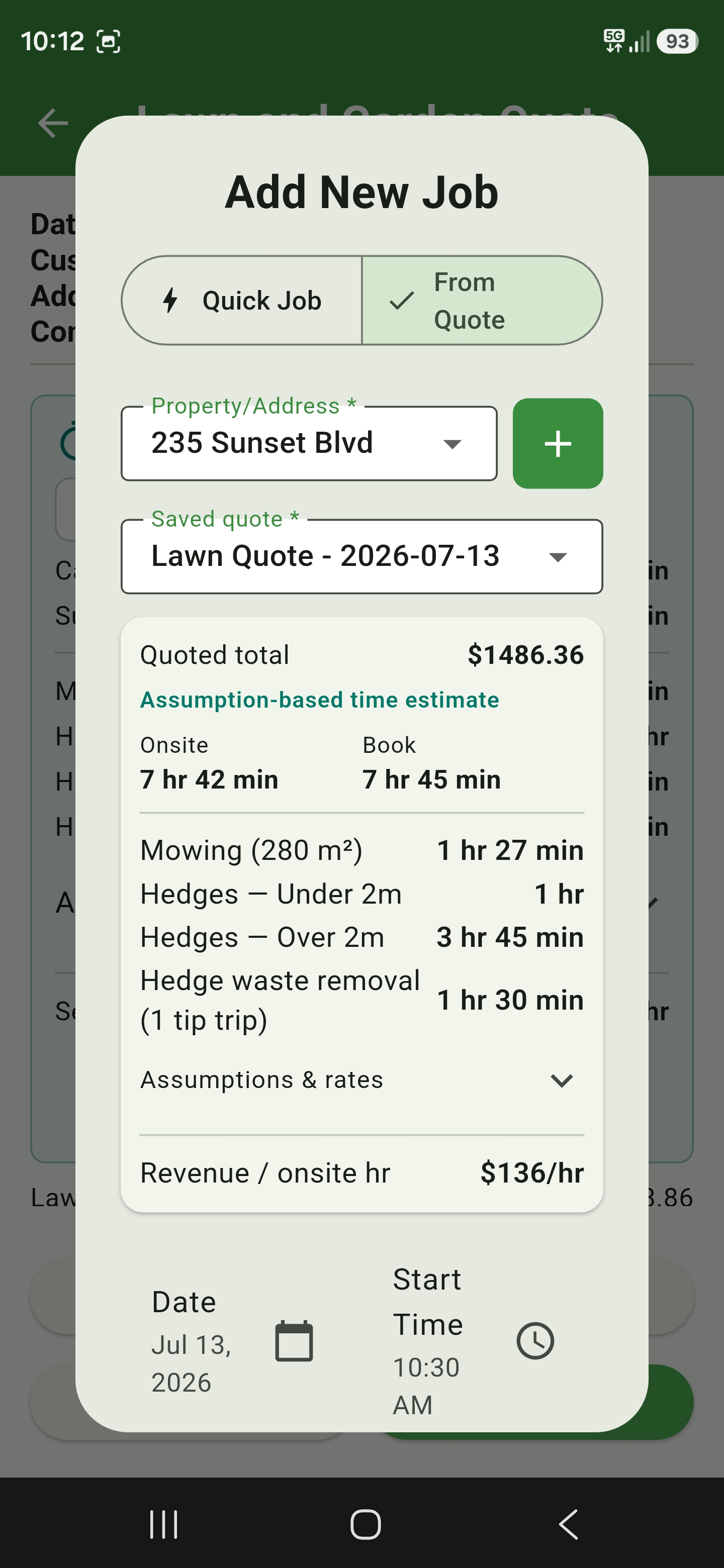
Open an accepted quote and choose Book job. Mow Quote carries the exact saved quote revision, quoted total, service details, and available time estimate into the booking screen.

  • Start from Accepted Quotes or the saved quote summary
  • Review the suggested booking duration before choosing a date
  • See duplicate-booking and schedule-conflict warnings before saving
  • Keep the job linked to the quote revision it came from
See the booking guide

* Only available on the Basic or Professional tier plans.

Saved lawn and garden quote with job estimate and Book job action
Add New Job screen in From Quote mode with quoted total and time estimate

Scheduling

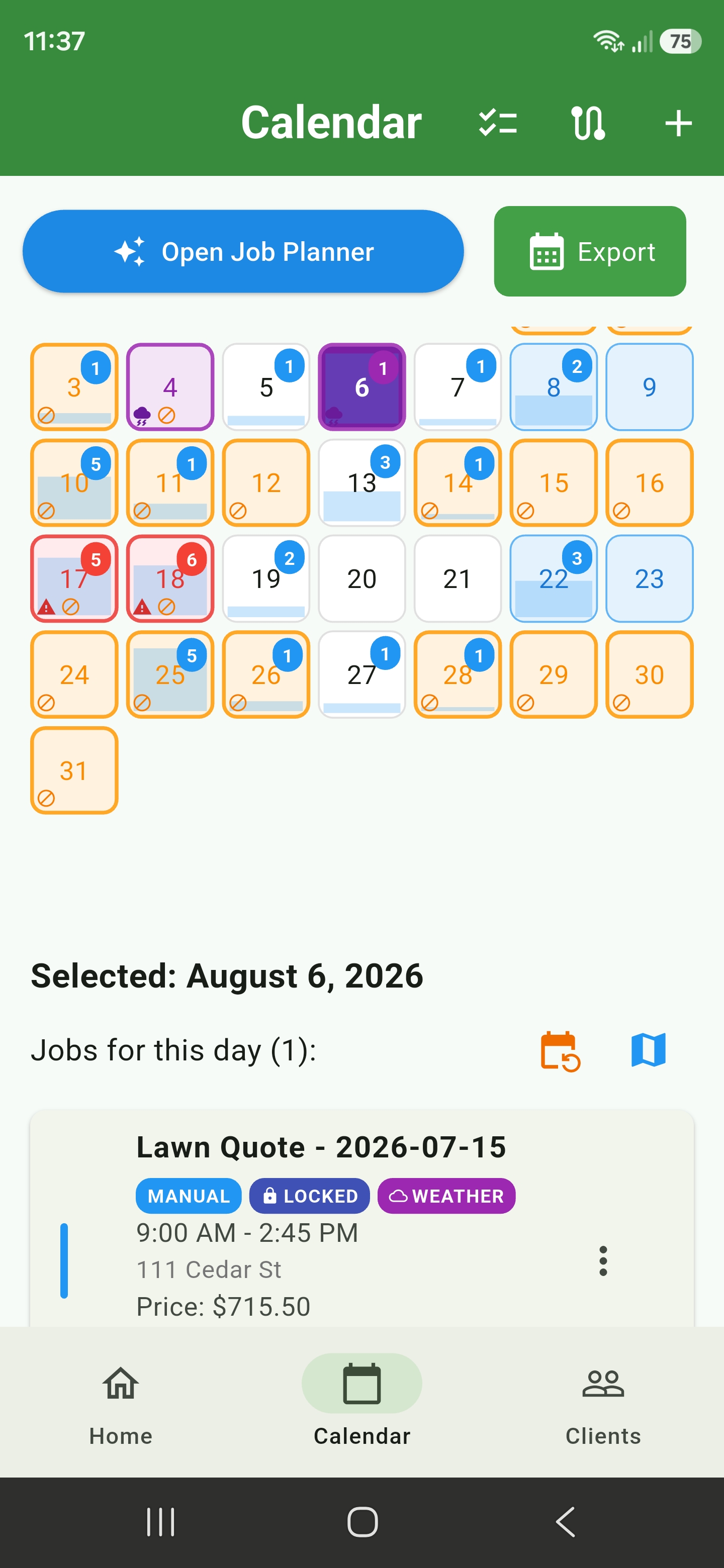
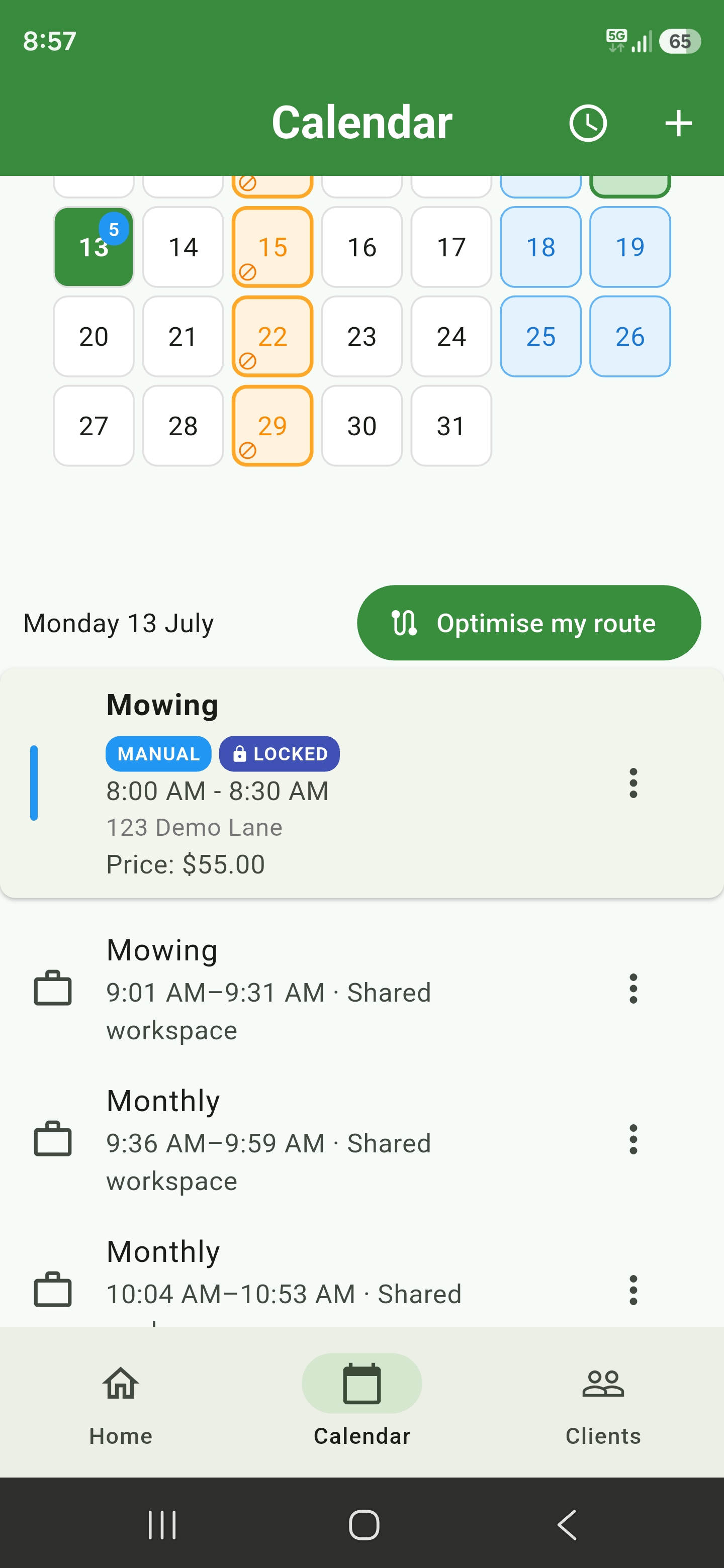
See each day's workload before it fills up

The blue fill rises from the bottom of each day based on estimated booked hours compared with that day's available working capacity.
A full blue cell means the day has reached or exceeded capacity, while job counts, weather warnings, and block‑outs stay visible.

  • At-a-glance daily capacity across the whole month
  • Job counts, weather alerts, and schedule conflicts
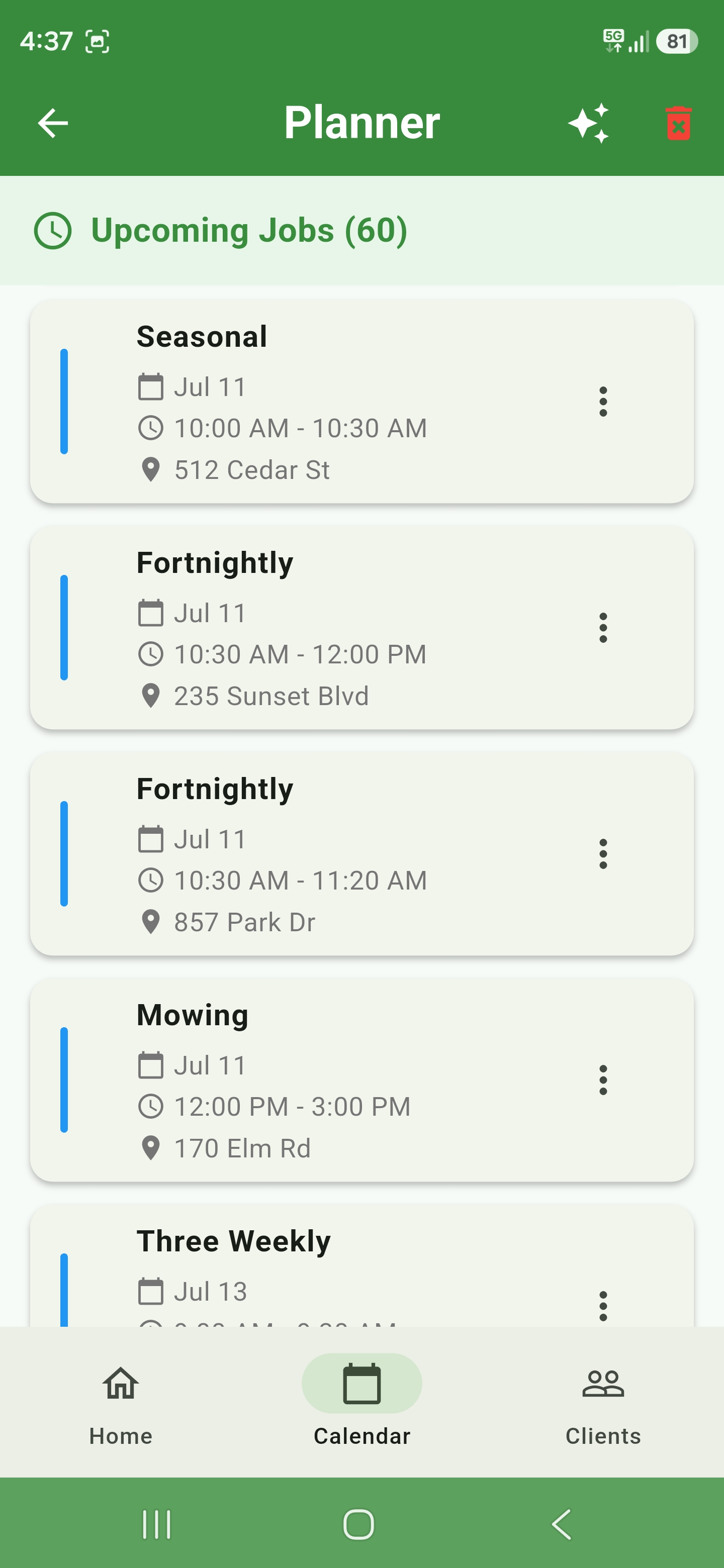
  • Full upcoming job list at a glance
Monthly calendar with blue daily capacity fills, job counts, weather warnings, and schedule conflicts
Job planner showing upcoming scheduled visits

Business workspaces

Nothing to set up until you hire - then give every worker the right view of the day

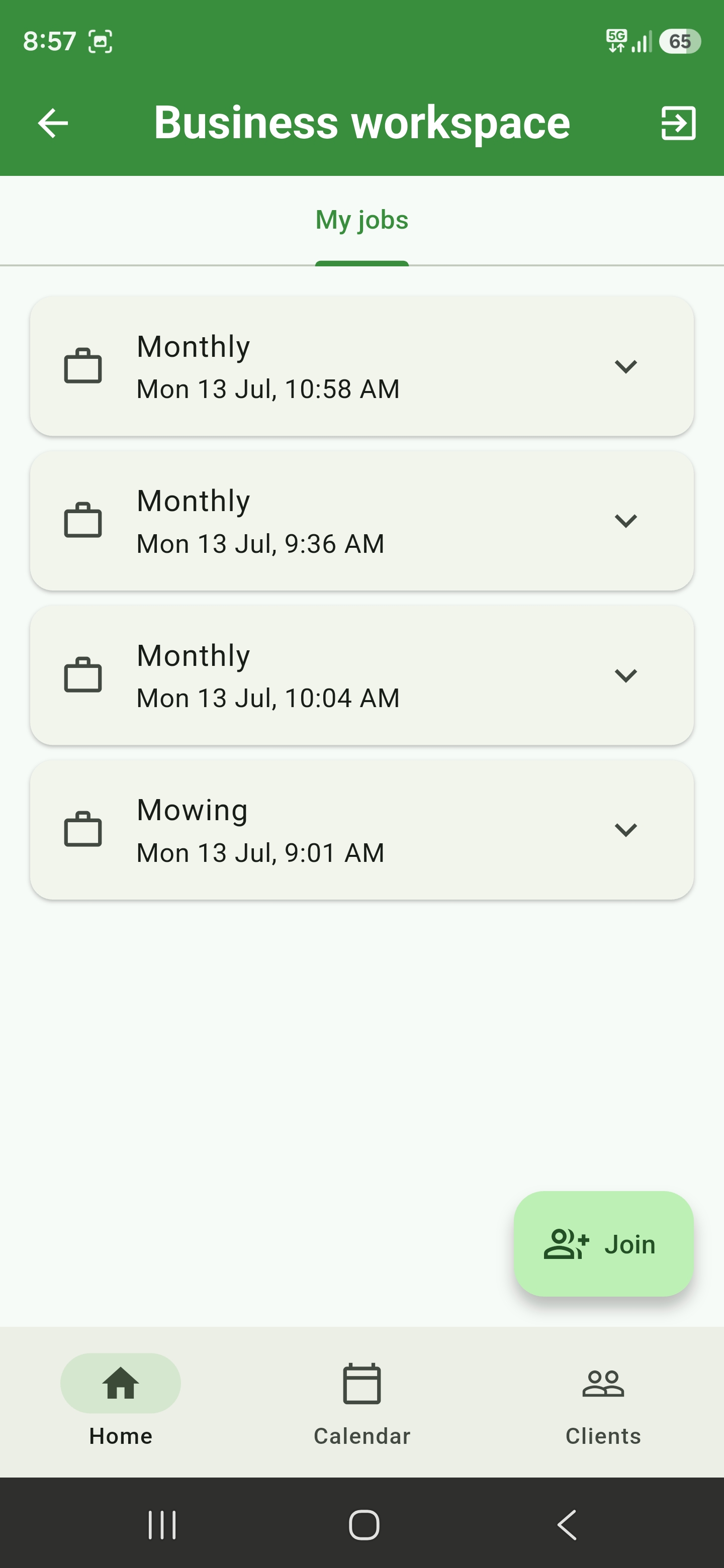
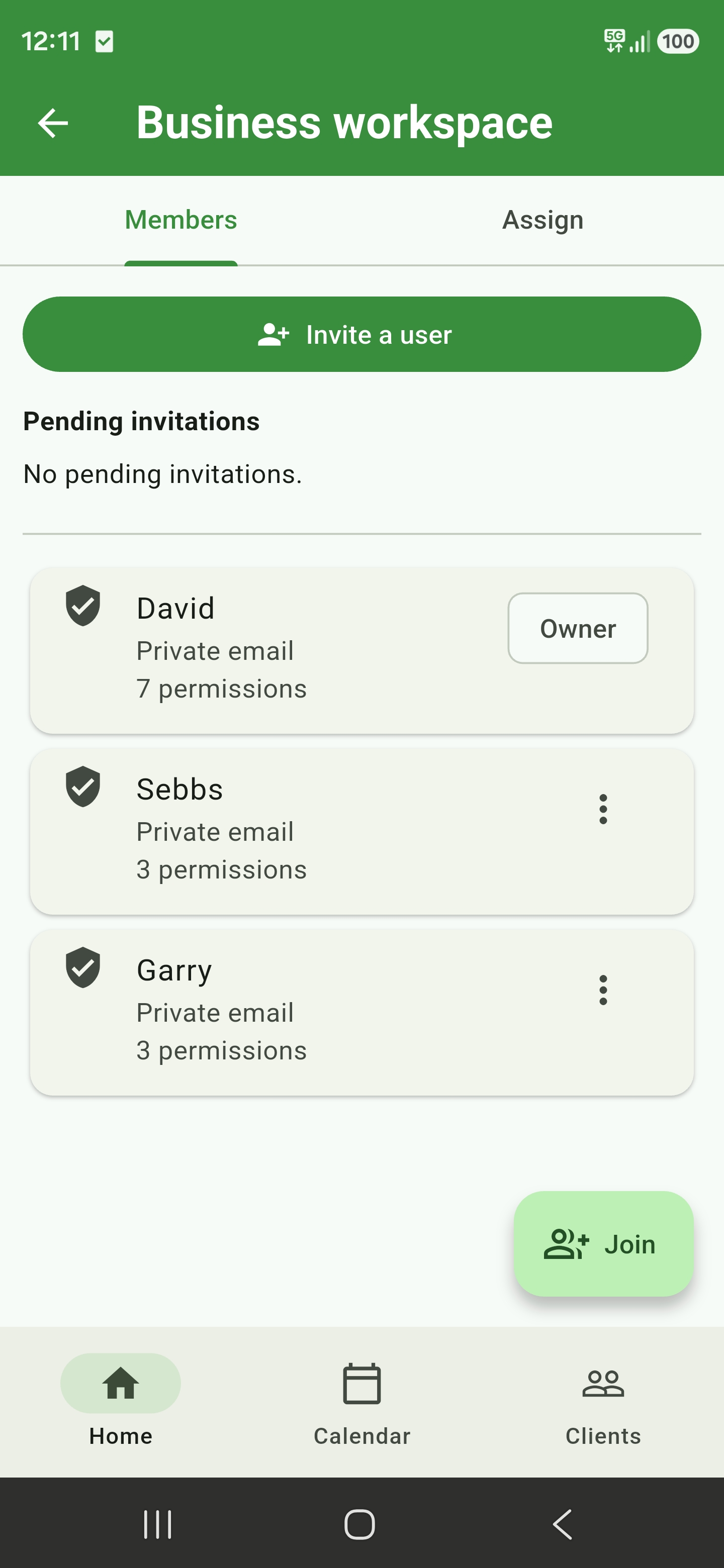
Create a workspace for your business, invite each team member with their own Google account, and assign upcoming jobs with clear worker instructions.
Each person sees only the jobs and client details needed to do their work.

  • Invite, manage, or remove members without sharing a login
  • Assign and reassign jobs with worker-safe instructions
  • Choose access for jobs, assigned calendar, and client contact details

* Only available on the Professional tier plan.

Business Workspace My jobs tab showing privacy-safe assigned jobs
Business Workspace members tab showing invitations and member permissions

Shared job calendar

When you take on help, they see what they need and nothing else

Workers with calendar access get a read-only month view of their assigned jobs.
Tap a day to see the time, address, and job instructions, then open Business Workspace to mark completed work.

  • Assigned jobs appear automatically in the worker's calendar
  • Daily job counts make the week easy to scan
  • Workers can complete jobs without access to pricing or private notes

* Only available on the Professional tier plan.

Shared calendar showing privacy-safe workspace jobs alongside the daily schedule

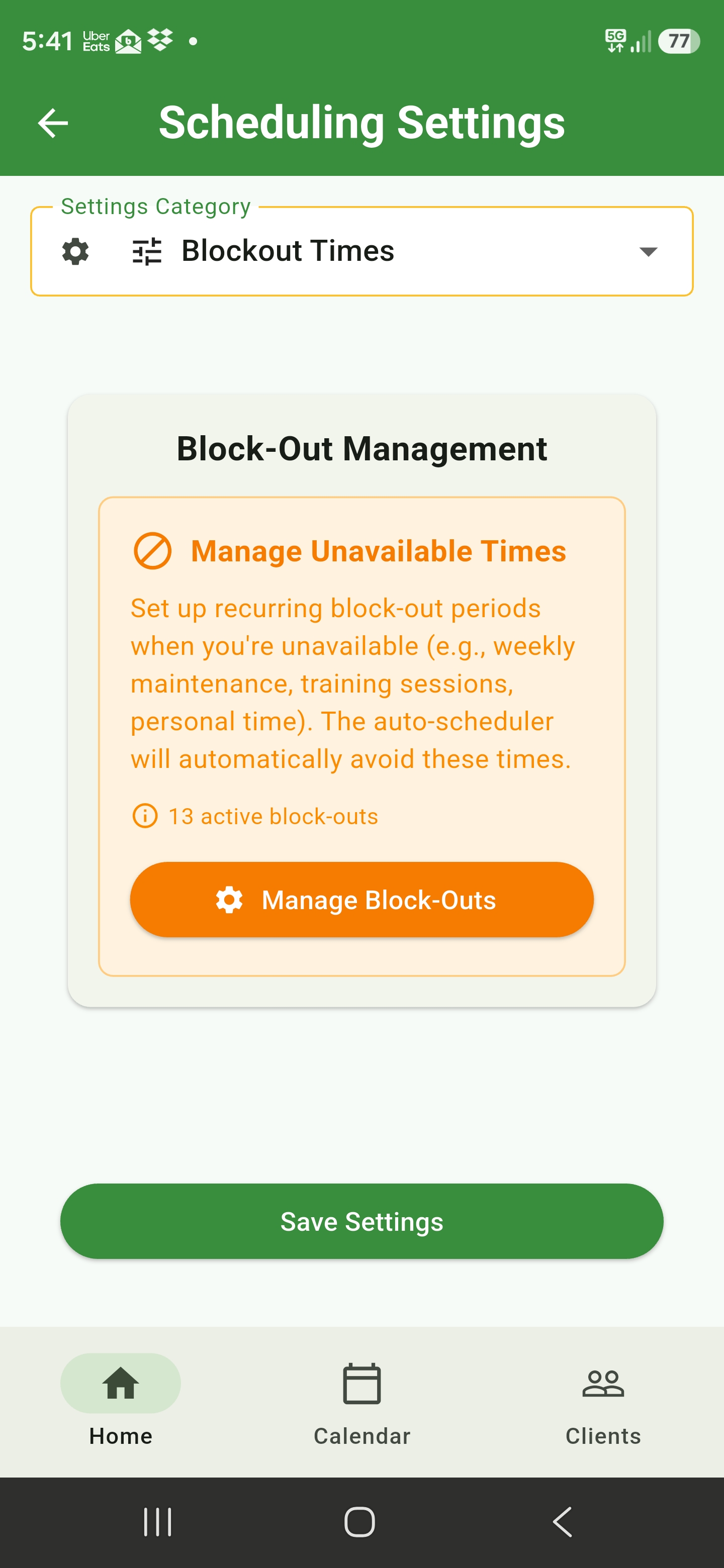
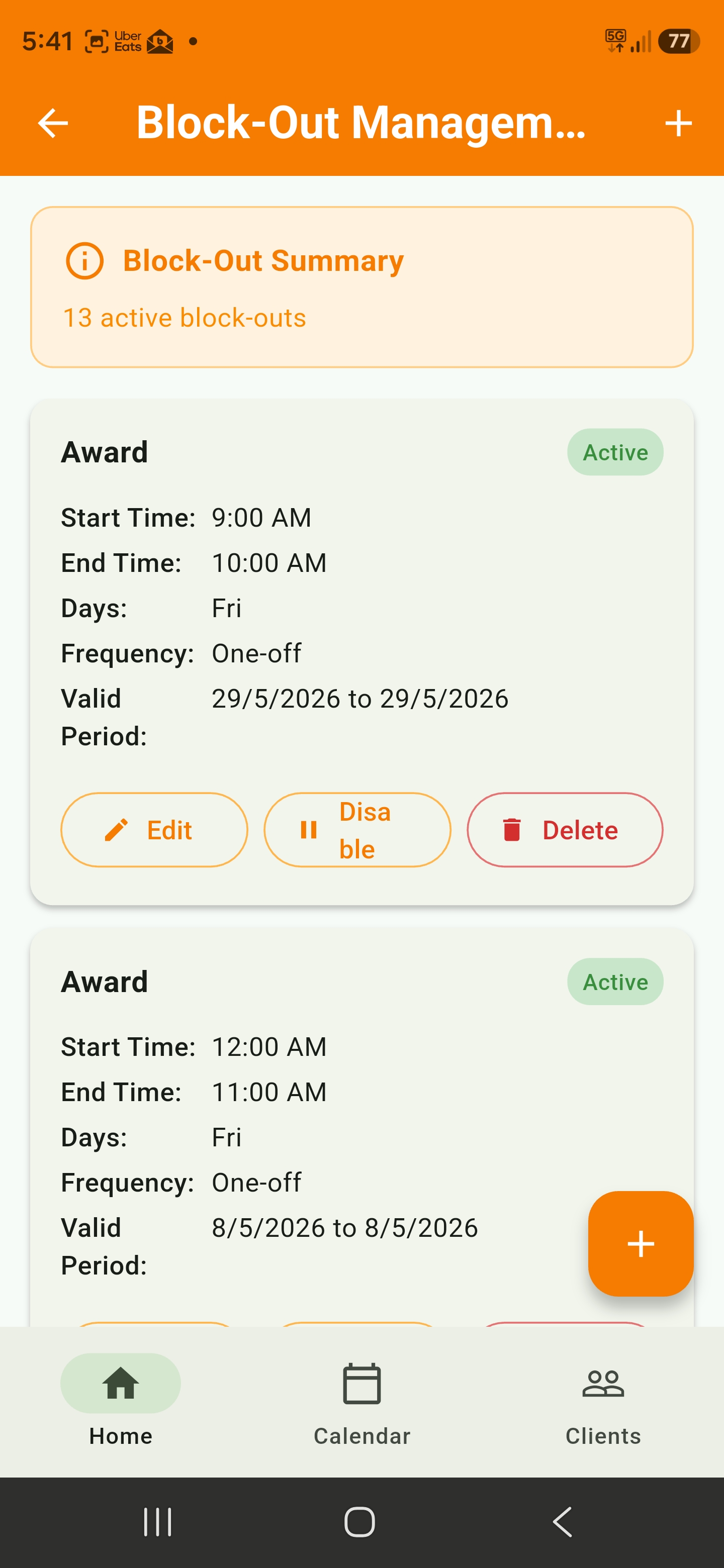
Block-out management

Keep unavailable times out of the schedule

Set recurring block-outs for maintenance, training, or personal time.
The auto-scheduler skips them automatically - no double-booking.

  • One-off or recurring unavailable periods
  • Highlighted on the calendar in orange
  • Edit, disable, or delete anytime
Scheduling settings for block-out unavailable times
Block-out management list with active periods

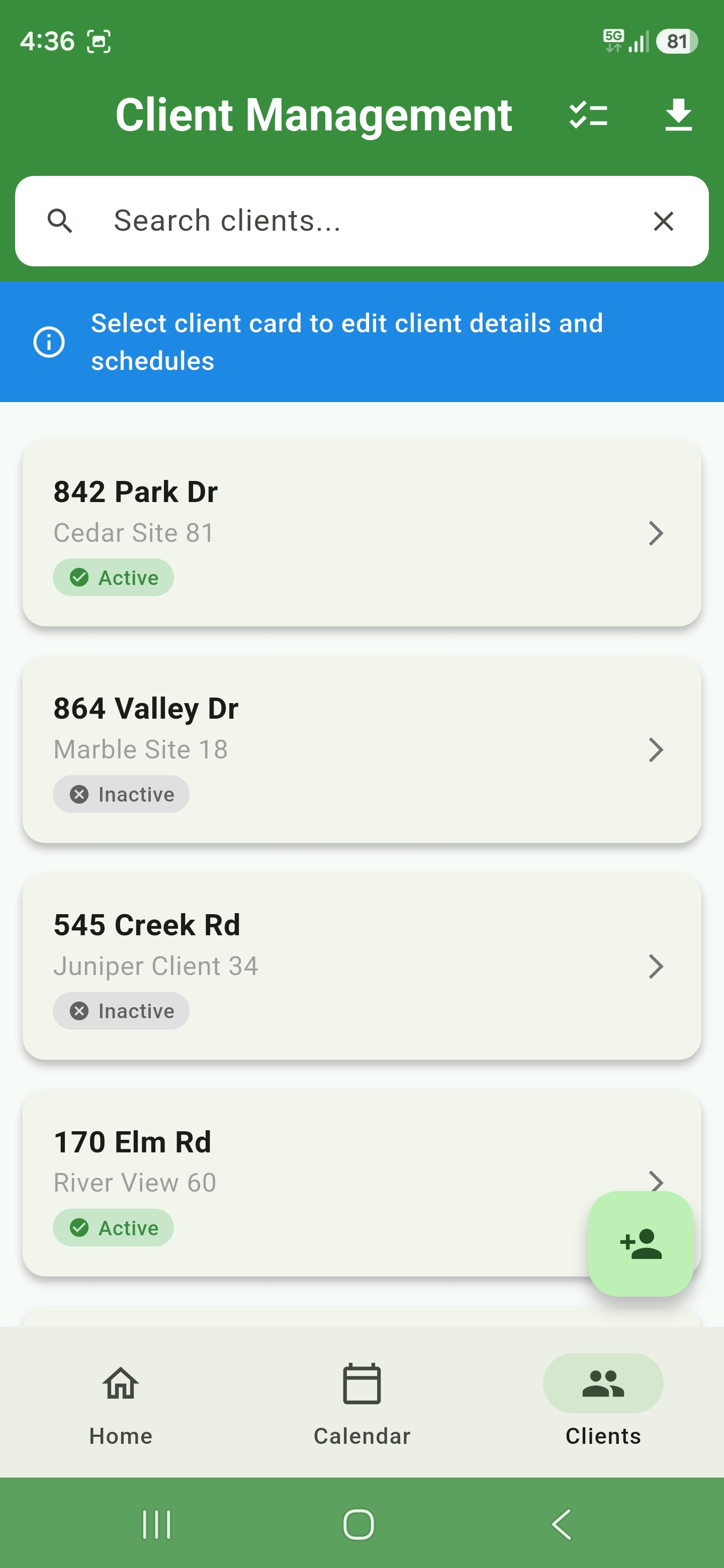
Clients

Every property, one place

Search clients by address or site name, see active and inactive status at a glance, and tap through to edit details, schedules, and job history.

  • Fast search across addresses and site names
  • Active / inactive status on every card
  • Schedules and details tied to each property
Client management list with search and status badges

Insights & profitability

Understand what is driving business performance

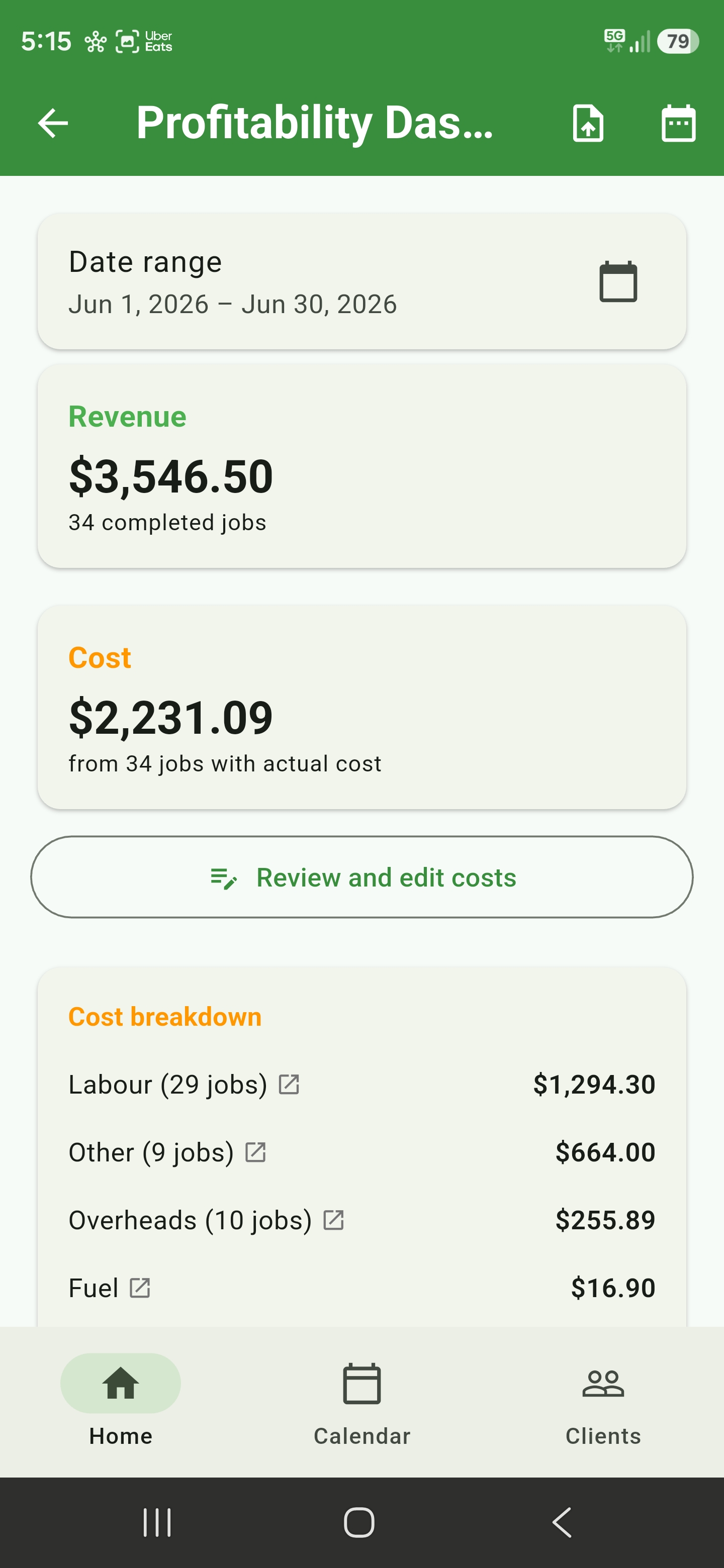
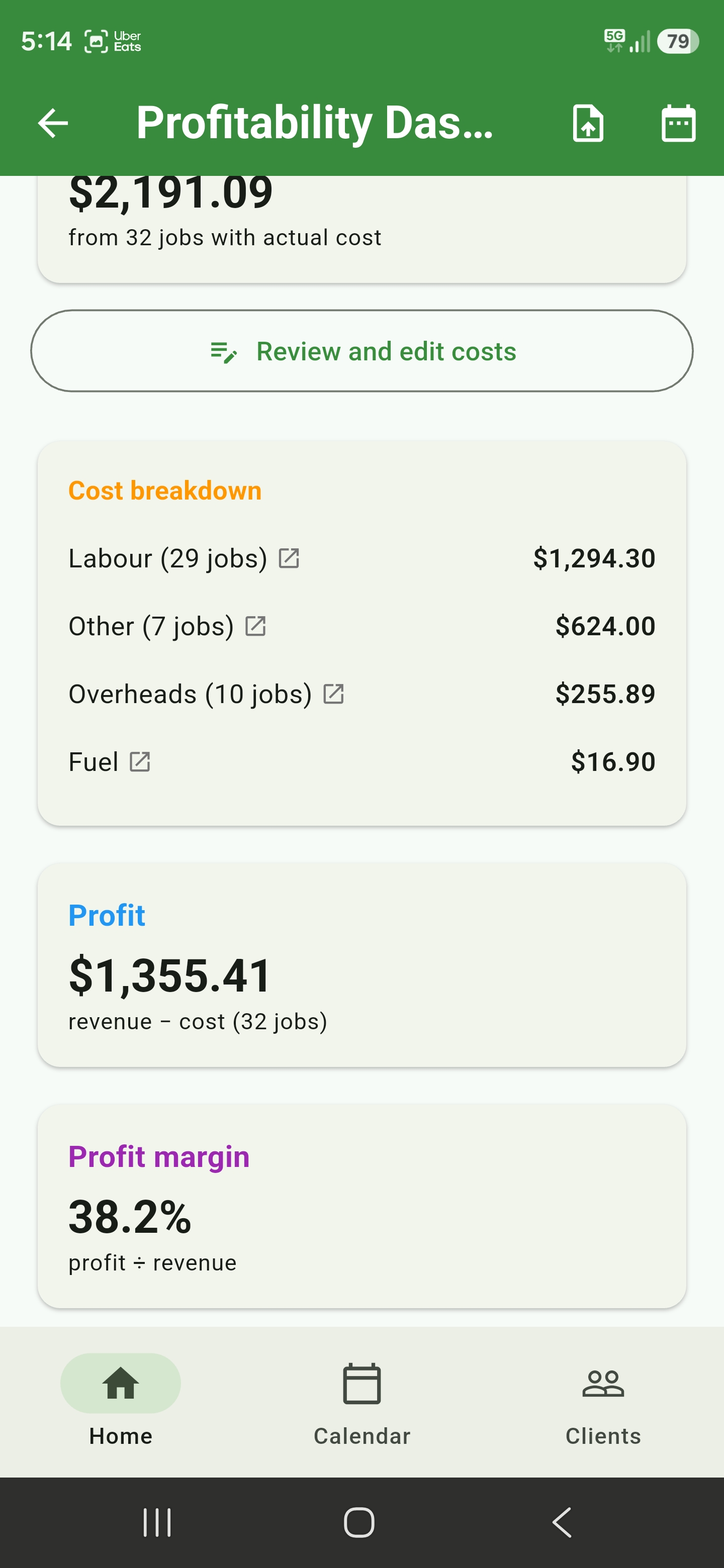
Revenue, costs, and profit margin for any date range - broken down by labour, fuel, overheads, and more.
Spot underpriced jobs before they stack up.

  • Revenue vs cost for completed jobs
  • Cost breakdown by category with drill-down
  • Profit and margin at a glance
Profitability dashboard showing revenue, cost, and breakdown
Profit and margin summary from profitability dashboard

Reporting & accounting

Reports and invoices when you need them

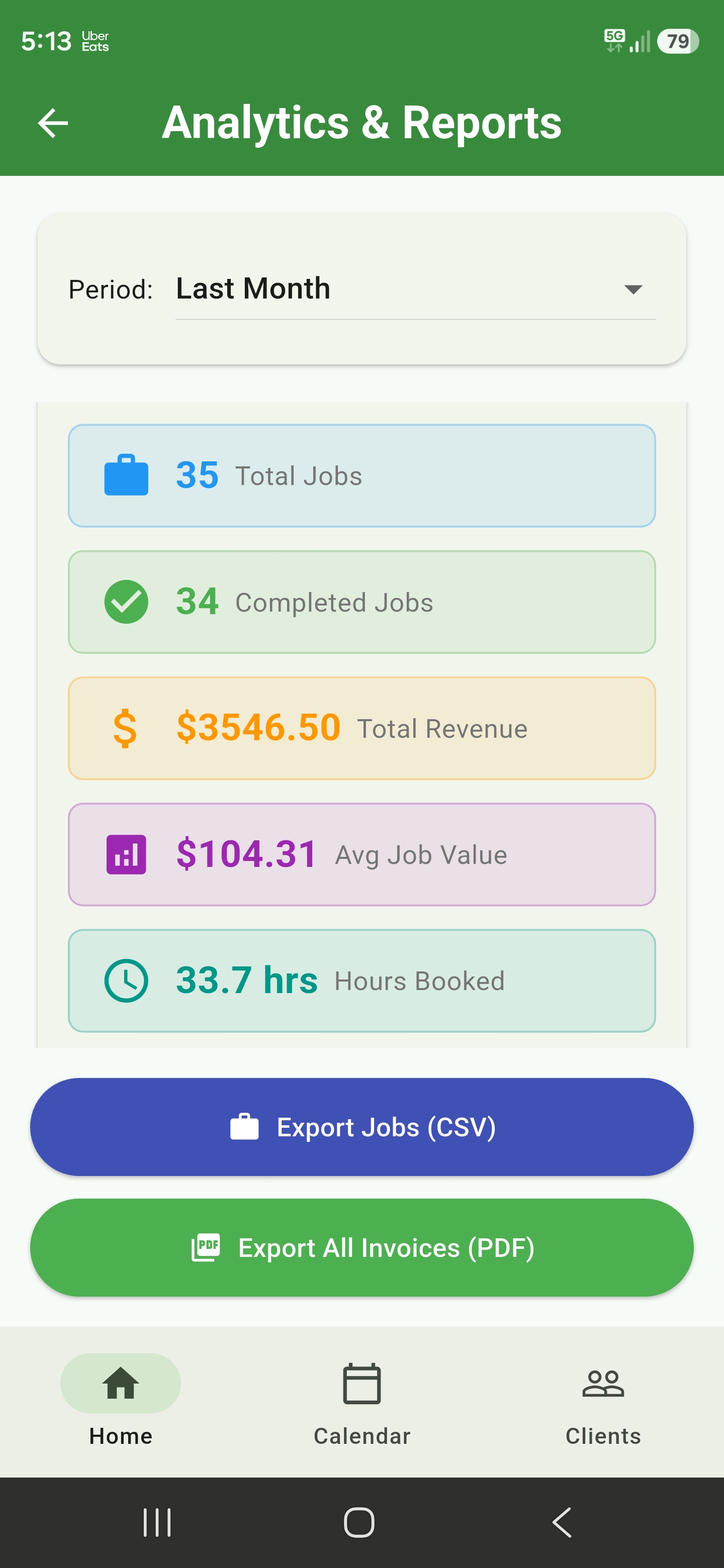
Jobs completed, revenue, average job value, and hours booked - filtered by week, month, or custom range.
Connect QuickBooks Online, Xero, or FreshBooks and choose where new invoices are sent.

  • Period filters from today to custom ranges
  • Revenue, job counts, and hours at a glance
  • Export jobs to CSV or invoices to PDF
  • Synchronize customers and invoices securely
Analytics and reports dashboard with export options

UI Builders

Configure forms, PDFs, templates, and emails

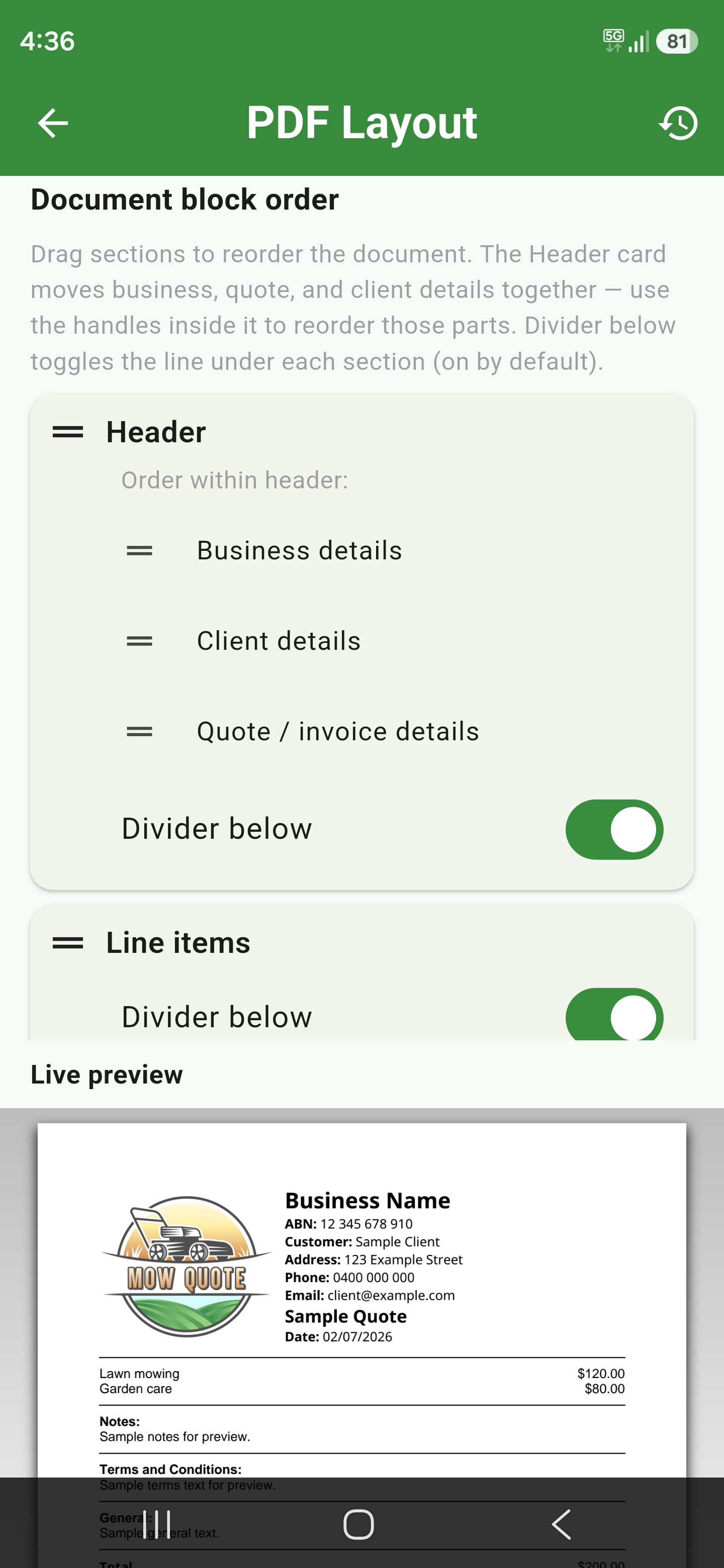
Use UI Builders to control Basic and Advanced quote sections, customise PDF layout, manage email templates, and keep reusable service packages ready for quotes.

  • Quote form builders for visible Basic and Advanced sections
  • PDF layout builder with live document preview
  • Reusable service templates for packages and upsells

* Advanced PDF layout controls require an owned Basic or Professional tier plan.

PDF layout builder with live document preview

Job tracking

Know which quotes need action

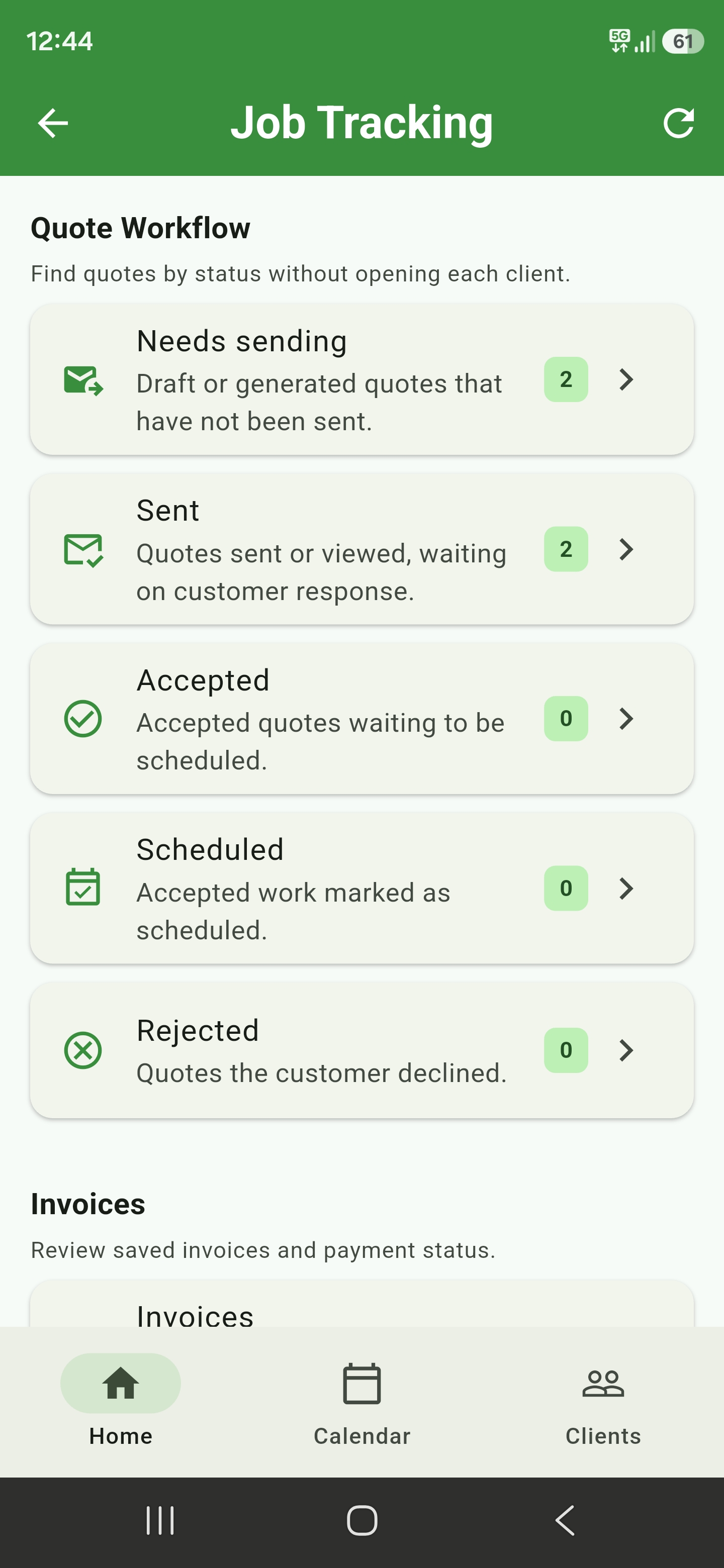
Review quote workflow status in one place, from drafts that need sending through to accepted, scheduled, and rejected quotes.

  • Find unsent and sent quotes without opening each client
  • Track accepted work waiting to be scheduled
  • Review saved invoices and payment status

* Only available on the Basic or Professional tier plans.

Job Tracking screen showing quote workflow statuses

Spraying

Chemicals, rates, and mix maths done

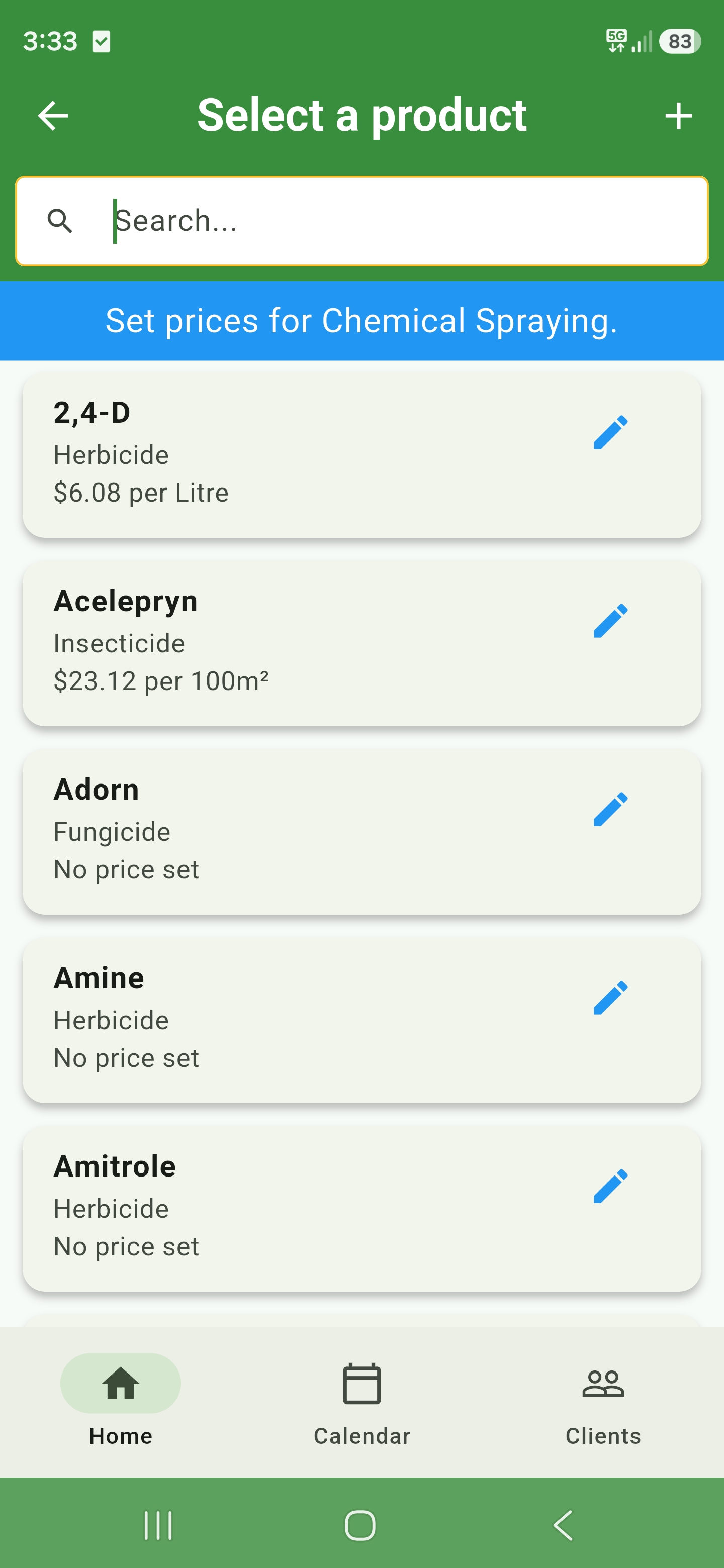
Build your product database with per-litre or per-area pricing.
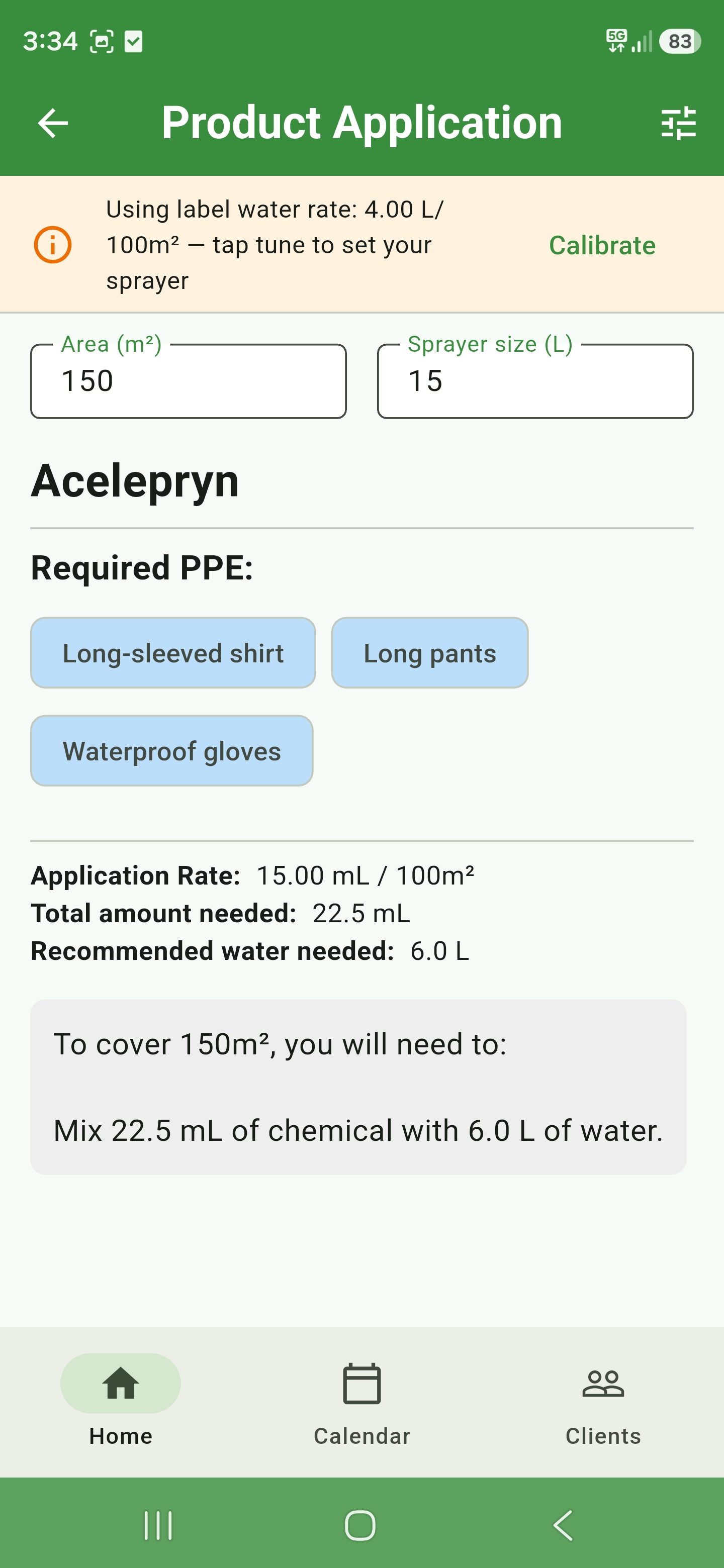
Enter area and sprayer size - the app calculates chemical volume, water, and required PPE.

  • Searchable herbicide, insecticide, and fungicide list
  • Set pricing per litre or per 100 m²
  • Application calculator with PPE and mix instructions
Chemical product database with pricing
Spray application calculator with PPE and mix rates

How it works

Up and running in three steps.
No training manuals, no IT department - just download and go.

Download & set up

Use guided setup to choose business details, mower calibration, Quote Health targets, quote-type pricing, and UI Builder settings.
Import clients or start fresh.

Quote & schedule

Create quotes on site, review Quote Health, share quote links for approval, book accepted work with the quoted details attached, and let scheduling fill your calendar.

Mow & grow

Complete jobs, track what's done, export reports, and sync invoices to QuickBooks Online, Xero, or FreshBooks when you're ready.

What's always free

Quote before you pay a cent.

We know how hard it is to get a business off the ground.
Some apps charge you just to work out a quote.
Mow Quote keeps the essential quoting tools free,
so you can price real work and build your business first.

No account needed

Open the app and start quoting

No trial clock, no subscription and no sign-in required for these tools.
This is a free tier, not a free trial - there is no expiry date.
Quoting happens on your phone, so it costs us nothing to run and it stays free. You only pay once you want your work kept online.

  • Five quote buildersLawn and garden, renovations, turf installation, spraying and cleanups.
  • Satellite lawn measurementMeasure lawn area and bring the result straight into your quote.
  • Everyday job calculatorsWork out minimum charges, mulch or soil quantities, fertiliser and spray applications.
  • Your own pricingSet up mower, labour and material pricing to quote the way your business works.
  • Mower calibrationSet mower speed, cutting width, overlap and operating costs for more accurate pricing.
  • Quote and PDF buildersChoose visible quote sections, use the standard document layout and your own logo, then produce a finished PDF quote or invoice and send it to the customer.
  • Your business detailsAdd your business name and contact details to quote and invoice PDFs.
  • Custom document wordingSet your own terms and notes, label quote documents Quote or Estimate, and rename GST to Sales Tax or VAT.
Free Starter account

Sign in and keep running the job for free

Save your business records and use the essential tools that turn a quote into scheduled work.

  • Manage up to 50 clients
  • Schedule up to 30 jobs per month
  • Create unlimited quotes
  • Keep up to 20 spray logs
  • Plan and schedule up to one month
  • Use the scheduling calendar
  • Use limited auto-scheduling
  • Create and manage block-outs
  • Set preferred service days
  • Add travel buffers between jobs
  • Optimise job order by location
  • Add worker instructions to jobs
  • Keep spray application logs
  • Export jobs to external calendars

Prices shown in Australian dollars.
Your app store confirms the final local price.

Professional

Professional: Team plan

A$44.99 / month

For established businesses coordinating crews and complex schedules.

  • Unlimited clients, jobs, quotes and spray logs
  • Plan and schedule up to six months
  • Everything in Basic
  • Multi-user business workspaces and member permissions
  • Assigned and combined worker calendars
  • Cross-workspace conflict protection
  • Worker rescheduling and optimised routes
  • Custom scheduling intervals
  • Advanced seasonal scheduling settings

Built in Australia

We mowed lawns.
Then we built this.

Mow Quote comes from Cerberus Software Australia - a Perth team that runs real lawn and garden jobs and builds software for the same work.

We quote between visits, juggle weather, and still aim to be home for dinner.
Every feature here exists because we needed it on the job - not because it looked good in a slide deck.

Email support
Lawn and garden quote with quote confidence panel

Mow Quote FAQ

Questions lawn care businesses ask

Everything you need to know before you start quoting, measuring and scheduling jobs with Mow Quote.

What is Mow Quote?

Mow Quote is the complete operating platform for lawn care, gardening, spraying, turf and landscaping businesses. It combines specialist estimating and Quote Health with CRM, secure quote approval, scheduling, job and team management, chemical records, performance insights and exports in one connected app.

How is Mow Quote different from a pricing calculator or a generic field service CRM?

It does both jobs in one app, on the phone at the property.
Mow Quote forecasts job time from your calibrated mower and task productivity rates, prices the work from the real cost of the crew and equipment doing it, and checks every quote against your target hourly rate before you send it.
The same app then carries accepted work through scheduling, crews, completion, invoicing and profitability reporting, so the pricing detail is not stranded in a separate calculator.

Is Mow Quote too much if I work on my own?

No.
A one-person round is the core user, not an edge case.
The free tools, the free Starter account and the Basic plan are all built for someone working alone, and you quote from your phone at the property rather than back at a desk. Crews, worker logins and shared calendars sit on the Professional plan and are entirely optional, so you never meet them if you work solo.
There is no per-seat cost, no minimum team size and no setup process before you can quote.

Will I outgrow Mow Quote, or have to switch later?

No.
The same app covers day one with no account, a busy solo round, and a first hire running a second crew.
Moving up is a plan change, not a migration: your clients, quotes, job history, pricing settings and spray records carry straight across, with no export and re-import and nothing deleted. The plan names - Starter, Growing, Team - are stages of the same business, not different products for different customers.

Does Mow Quote estimate how long a job will take?

Yes. Mowing time is calculated from cutting width, your overlap setting, walking speed, bagging and a real-world efficiency factor for turning and obstacle work. Other tasks use productivity rates you set and tune, including weeding area per hour, hedge metres per hour by hedge type, per-tree minutes with access modifiers, brush cutting, and mulch spreading with pickup trips. Setup and pack-down time, a contingency percentage and booking rounding are applied on top, and each estimate reports its confidence rather than inventing a missing rate.

How does Mow Quote work out a minimum charge?

From your real costs, not a rule of thumb. Build an asset register of the vehicles and equipment you use, group staff and assets into cost teams, then let Mow Quote combine that team cost with return travel, overhead recovery, unbilled owner and team time, your profit goal and GST settings. The same team-cost basis flows into travel guidance and the minimum-charge check on the quote summary.

Which accounting software does Mow Quote connect to?

Intuit QuickBooks Online, Xero and FreshBooks. Connect an account, choose where new invoices are sent, and sync customers and invoices securely. You can also export jobs to CSV and invoices to PDF, and store documents in Google Drive.

Can Mow Quote measure a lawn from satellite imagery?

Yes. Plot the property boundary over satellite imagery, then exclude driveways, garden beds, pools, sheds and other non-lawn areas to calculate the lawn area for your quote.

Can I create professional lawn mowing quotes?

Yes. Build quotes for mowing, gardening, turf, renovations, spraying and more. Use your own pricing, hourly rates, minimum charges and service details, then create a professional PDF to send to the customer.

Does Mow Quote schedule recurring lawn care jobs?

Yes. Free Starter includes recurring schedules, preferred service days, travel buffers and basic conflict checking. Paid plans add saved-quote booking and longer scheduling reach, while Professional adds worker assignment and combined calendars.

Is Mow Quote built for Australian lawn care businesses?

Yes.
Mow Quote was built in Perth by people who run lawn and garden jobs.
It is designed for the practical work of quoting, scheduling and managing a lawn care business, whether you work solo or with a team. It also travels: switch between metric and imperial units, label quote documents Quote or Estimate, and rename GST to Sales Tax or VAT in settings.

Where can I download Mow Quote?

The native iPhone and iPad app is available now on the Apple App Store, the native Android app is on Google Play, and the web app runs in your browser. You can start with the free plan today and purchase a mobile subscription in-app through your device’s app store.
Web checkout is not available yet.